Yes, Nvidia Broadcast costs frames, because its noise removal runs on the same graphics card that renders your game. Nvidia's own figure is a 5 to 10% hit from its effects on a GeForce RTX 5090, and that number moves with the game, the card and how many effects you switch on.
The alternatives don't avoid the cost. They move it somewhere else. Discord's built-in Krisp, SteelSeries Sonar's ClearCast AI and the RNNoise filter in OBS all run on the processor. AMD lets you choose. Windows now has its own suppressor that some apps use without asking. Picking one is mostly a question of which part of your PC has headroom to spare.
Note
Key Takeaways
- Nvidia Broadcast runs on the GPU's Tensor Cores. Nvidia measures its effects at 5 to 10% on an RTX 5090, and audio-only use is the light end of that.
- Studio Voice is the expensive audio effect. Nvidia says it isn't recommended while gaming.
- Discord's Krisp, SteelSeries ClearCast AI and OBS's RNNoise run on the CPU. Krisp switches itself off when CPU usage gets very high.
- AMD Noise Suppression lets you pick CPU or GPU processing. It needs a Radeon RX 6000 card or a Ryzen 6000 APU, or newer.
- Run one suppressor, not two. Chaining them adds cost and makes your voice sound worse.
- GPU-bound games suit a CPU-based tool; CPU-bound, high-refresh shooters suit a GPU-based one.
Does Nvidia Broadcast Affect FPS?
Nvidia Broadcast does lower FPS, and Nvidia's FAQ puts the effects' combined impact at 5 to 10% on an RTX 5090. The same page says the cost depends on the GPU, the game, webcam resolution and frame rate, and the number of effects running.
That range covers the video effects too: background removal, auto frame, eye contact. Those process every webcam frame. Nvidia doesn't publish a separate figure for microphone noise removal on its own. Audio is a far smaller stream of data than 1080p video, though, so a mic-only setup should land at the low end of the range rather than the top.
Be clear about what that estimate rests on. The 5 to 10% figure is Nvidia's own, measured on its own flagship card. Tom's Hardware's hands-on test of Broadcast judged the noise removal by ear and published no frame rate numbers, and we haven't found an independent test that isolates audio-only noise removal on current RTX cards. Until someone publishes one, your own frame-time capture is the only number worth trusting.
Two things push it higher. The first is stacking effects: Nvidia says running several at once has a larger impact, and its advice is to turn on only the ones you're actively using. The second is Studio Voice. Nvidia calls it an AI equalizer that spectrally enhances your voice, says it needs more GPU resources, and doesn't recommend it during gaming. It also needs a desktop RTX 3060 or better.
Video memory is the part people forget. Broadcast holds its models in VRAM, and Nvidia's 1.3 update cut that usage by over 40%, which it said raised frame rates in games. On an 8GB card that allocation still counts, for the reasons laid out in how much VRAM a game actually needs.
GPU or CPU: Where Each Tool Does Its Work
Every AI noise suppressor runs a neural network on each slice of microphone audio, so the useful question is which processor does the work. This table sorts the current options by that.
| Tool | Runs on | Hardware needed | Price | Filters for |
|---|---|---|---|---|
| Nvidia Broadcast | GPU (Tensor Cores) | GeForce RTX 2060 or newer | Free | Any app, via a virtual mic |
| Discord Krisp | CPU, on your device | Discord on Windows, Mac, Linux, mobile or browser | Free | Discord only |
| SteelSeries Sonar ClearCast AI | CPU | Any mic, Windows 10 or later | Free | Any app routed through Sonar |
| AMD Noise Suppression | CPU or GPU, your choice | Radeon RX 6000 or Ryzen 6000 APU, or newer | Free | Any app, via a virtual device |
| OBS RNNoise filter | CPU | Any PC running OBS | Free | Your stream and recordings only |
| Windows Voice Clarity | CPU | Any x64 or Arm64 Windows 11 PC | Built in | Apps that use Communications mode |
The reasoning that follows from it is simple. At 1440p or 4K with high settings, most games keep the graphics card near full load and leave processor cores idle, so a CPU-based suppressor is the cheaper fit. In a competitive shooter running at hundreds of frames per second, the CPU is often the limit, and there a GPU-based tool can hurt less.
You can see which case you're in from GPU usage. A card sitting well below full load in-game points to a CPU limit.
Nvidia Broadcast: Setup and the Settings That Keep It Cheap
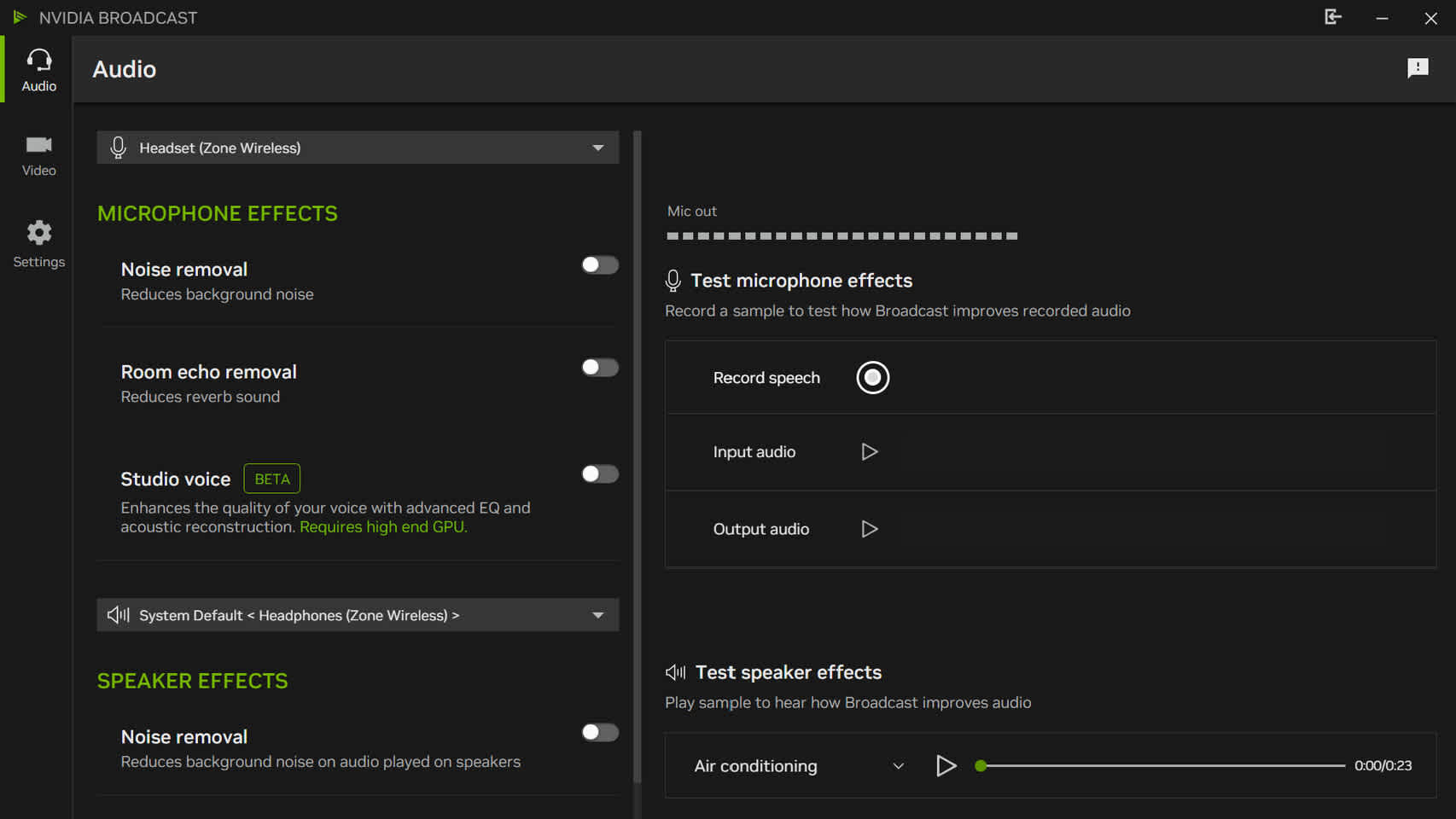
Broadcast installs virtual audio devices, and any app you point at them gets the cleaned-up sound. Setup takes a few minutes. The minimum spec is a GeForce RTX 2060, 8GB of RAM, 64-bit Windows 10 or 11, and a 570-series driver or newer.
GTX owners are out. Broadcast requires an RTX card. The older RTX Voice beta did run on GTX cards, but Nvidia's own guide now points users to Broadcast's Noise Removal as its replacement, so treat RTX Voice as unsupported legacy software.
Setting it up
Setup takes four steps, and the third is the one people skip.
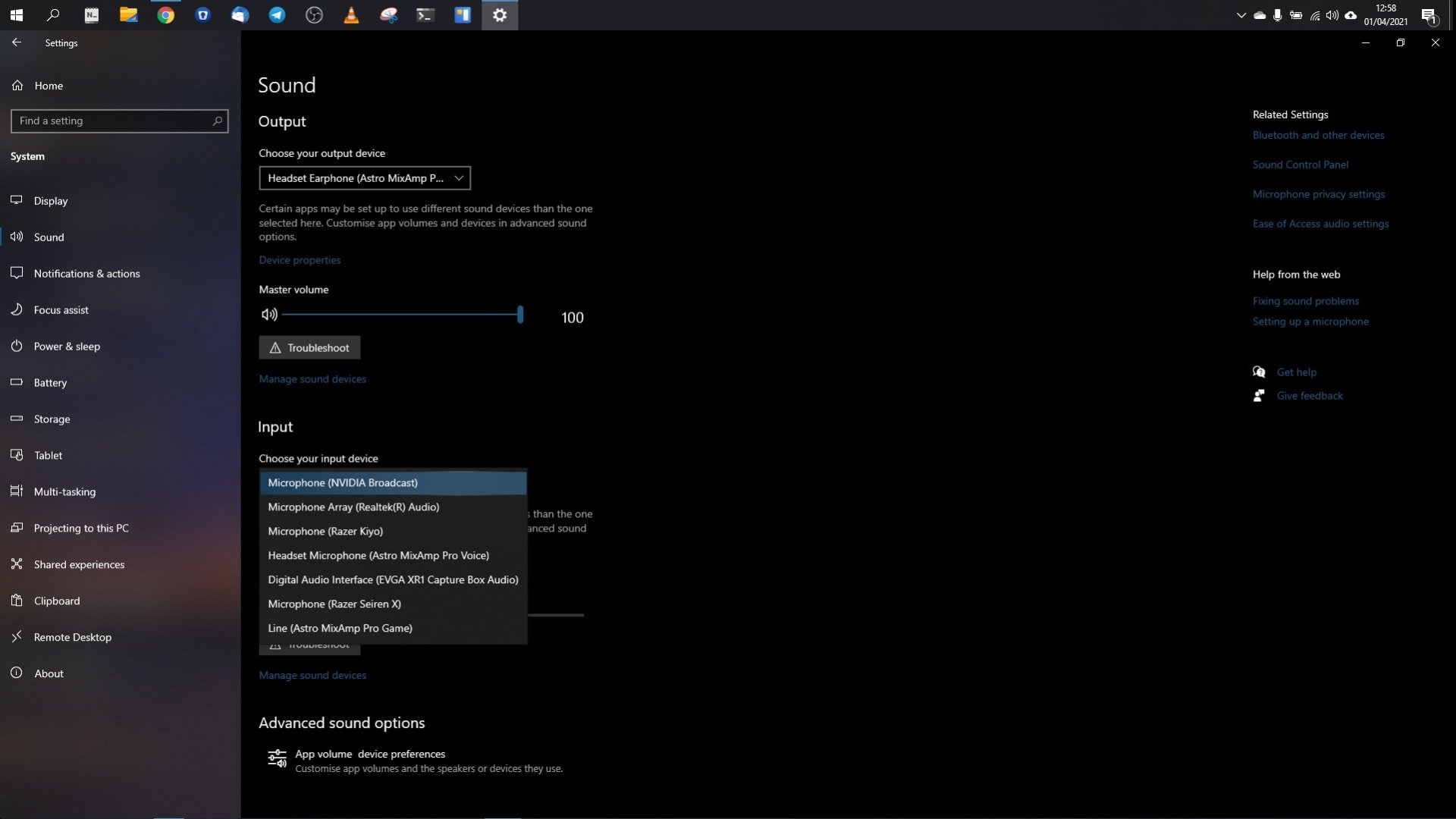
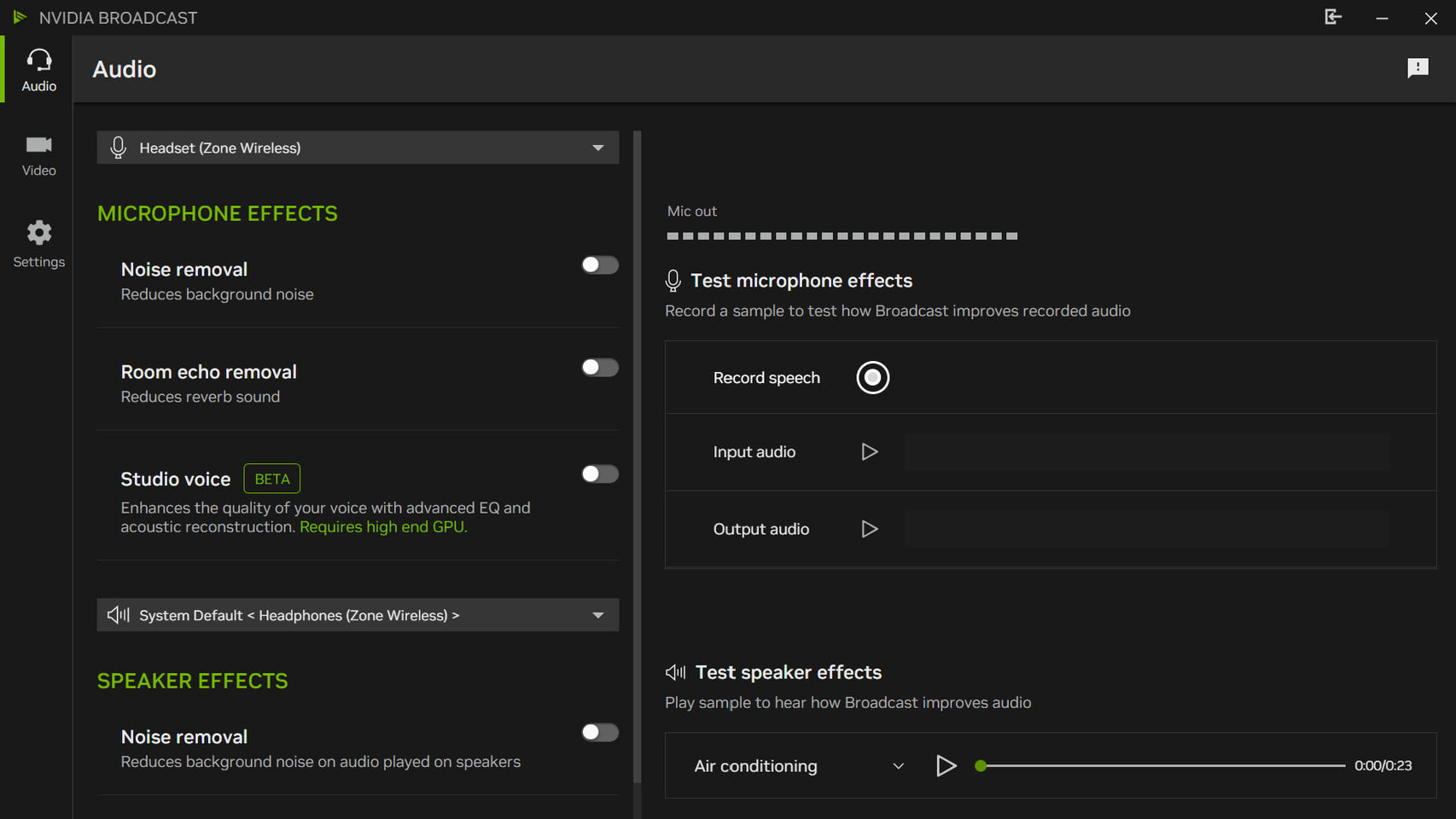
- Install Broadcast, open the Audio tab, pick your real microphone at the top, and switch on Noise Removal.
- In Discord, go to User Settings, then Voice & Video, and set the input device to Microphone (NVIDIA Broadcast).
- Set Discord's own Noise Suppression to None, so Krisp doesn't process the same audio a second time.
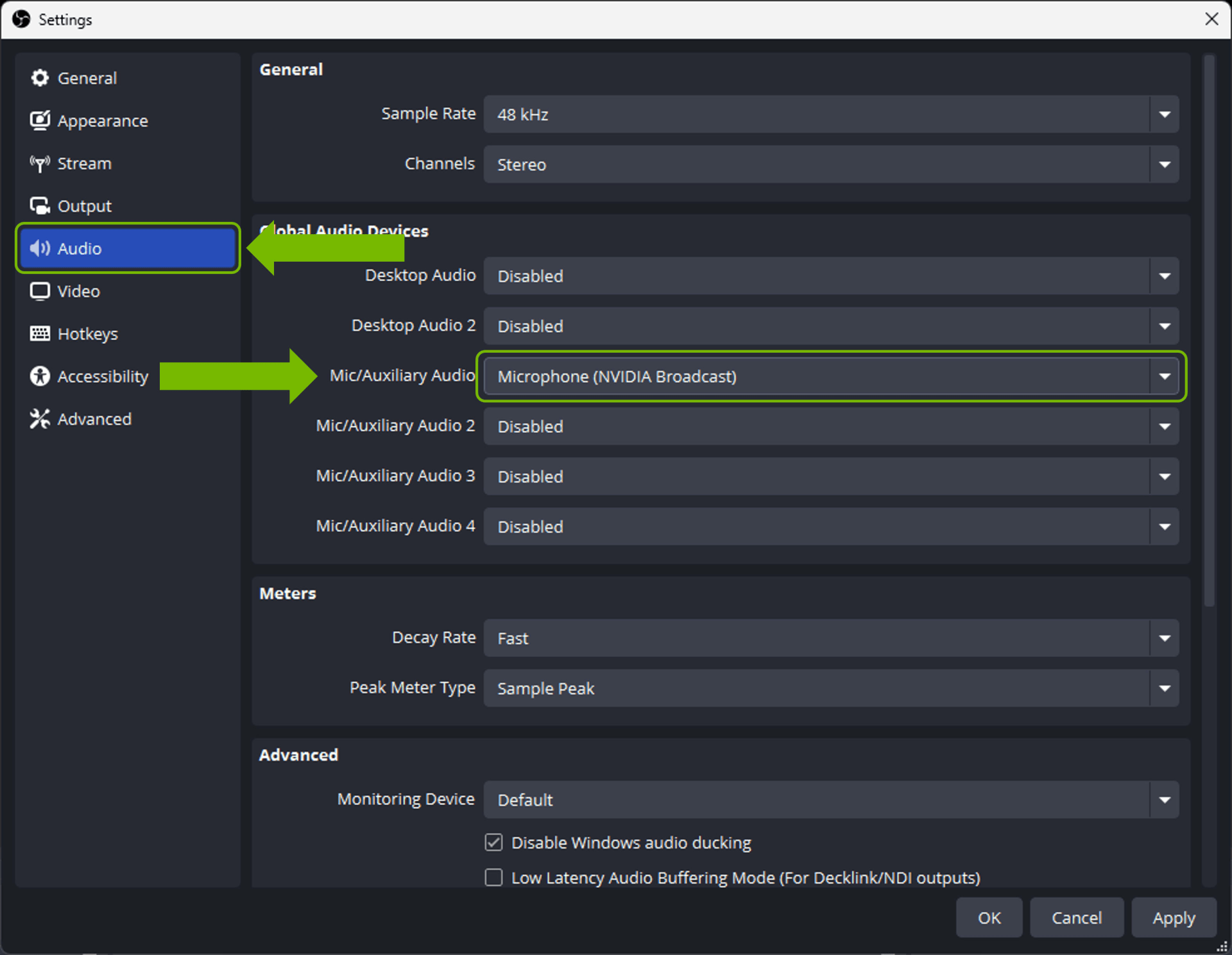
- In OBS, set Mic/Auxiliary Audio to the same NVIDIA Broadcast microphone. One device then feeds both your call and your stream.
Keeping the cost down
Leave Room Echo Removal off unless your room echoes. Leave Studio Voice off while you play. Nvidia's RTX Voice guide gave advice that still applies: use noise removal on your microphone, and on your speakers only if you need it, because it uses system resources you can otherwise keep.
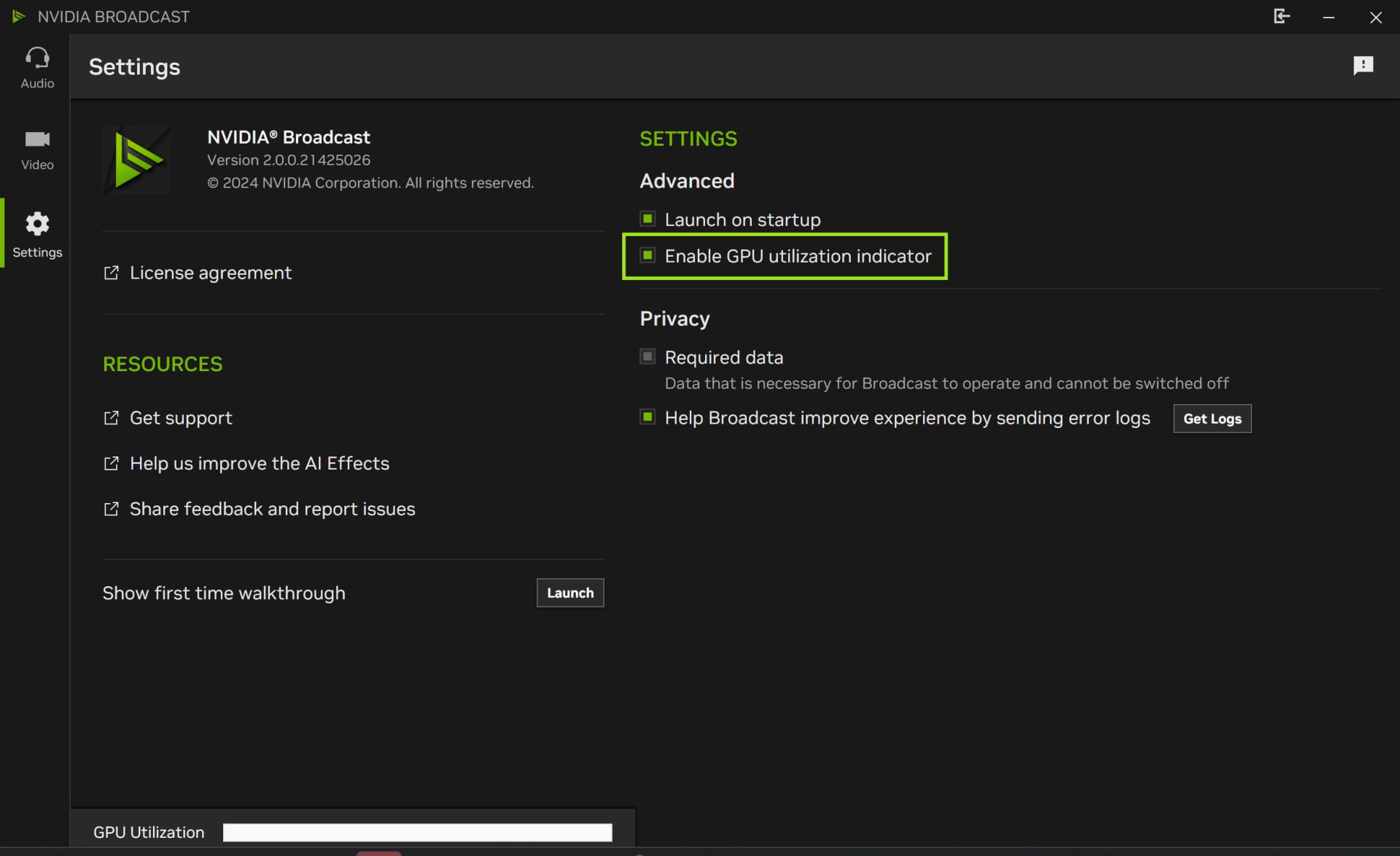
Broadcast's Settings page has a GPU utilization indicator. Turn it on for a session and you'll see what your chosen effects cost on your card, instead of relying on a figure measured on someone else's RTX 5090.
The 2.x releases are worth having. Version 2.0.1 brought back the strength sliders for noise and room echo removal, and version 2.1.0 added multi-GPU support. Version 2.2.0 took Studio Voice out of beta.
Discord's Built-In Krisp
Discord's Krisp is a machine learning noise filter that Discord says runs entirely on your device, with no audio sent to Krisp's servers. It's free inside Discord, so if your voice chat happens there, you may not need anything else.
Turn it on from the noise suppression icon while you're in a voice channel, or from User Settings, then Voice & Video, then Noise Suppression. It works on Windows, Linux, Mac (Apple silicon on macOS 12 or later), Android, iOS, and in Chrome and Firefox.

Discord's FAQ lists three limits worth knowing:
- Krisp only filters noise from your side of the call. It does nothing about a teammate's loud fan.
- It works best on non-human sounds like fans, keyboards, traffic and barking. Discord notes it can reduce quality in a quiet room.
- If your CPU usage gets very high, Krisp turns itself off automatically.
That last one matters for gamers. If a game pins your CPU, suppression can drop out in the middle of a match, and your squad hears your keyboard again without warning. The CPU cost itself, and when to switch Krisp off to reclaim it, is covered in our look at whether Discord lowers your FPS.
SteelSeries Sonar ClearCast AI
SteelSeries describes ClearCast AI as "CPU-based to prevent frame drops," and it works with any microphone, not just SteelSeries hardware. It comes free with Sonar, the audio mixer inside SteelSeries GG, on Windows 10 or later.
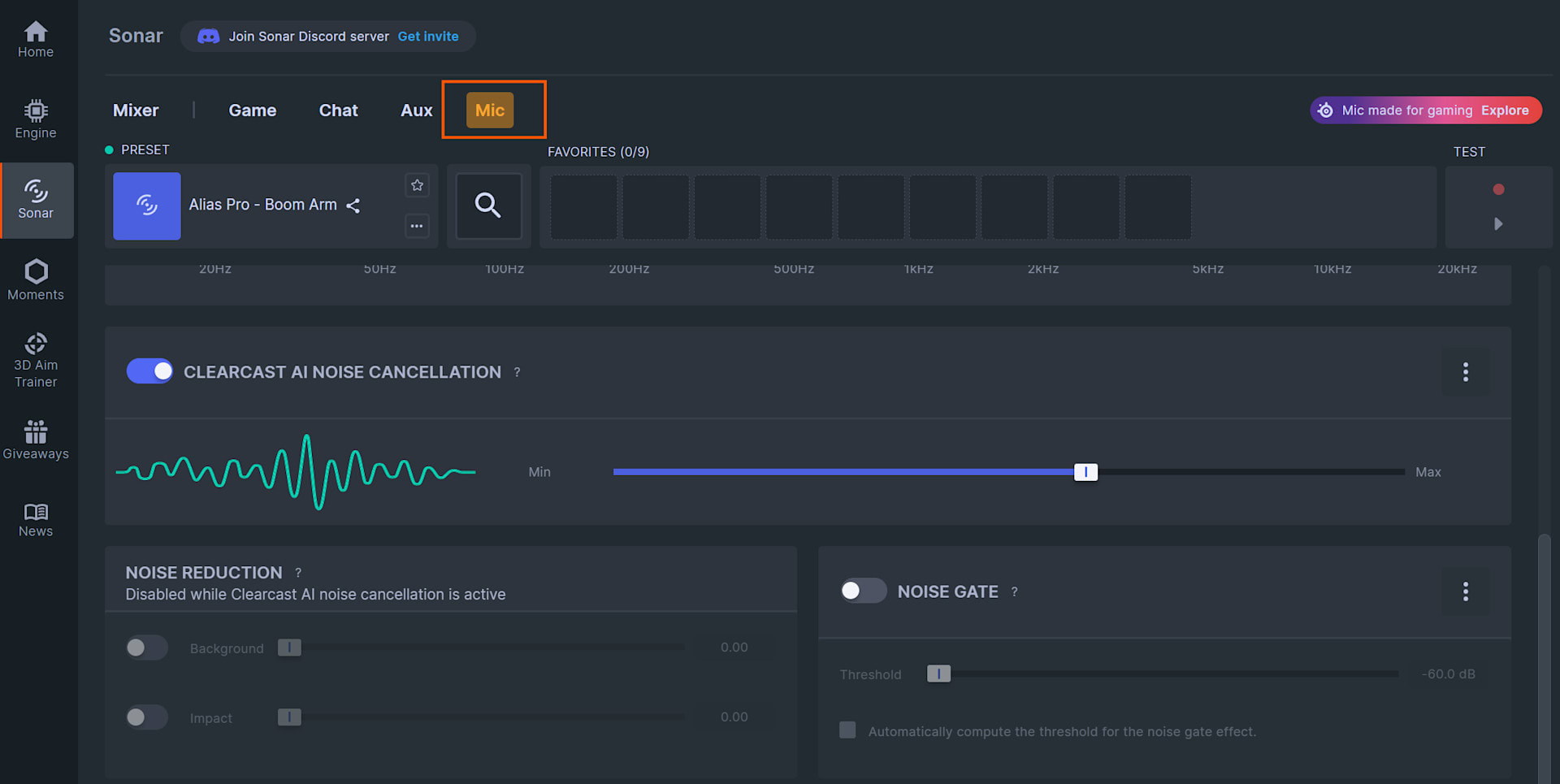
It lives in Sonar's Mic tab as a toggle with a Min to Max strength slider. Sonar's older, non-AI noise reduction controls are disabled while ClearCast is on, so the two can't stack. SteelSeries' support pages add one condition: GG Sonar has to be running in the background, or the feature doesn't work.
The appeal is routing. Sonar already splits game, chat and mic audio into separate channels, and ClearCast filters the mic channel. So you set Discord or your game's voice chat to Sonar's microphone device and get suppression in every app. If you already use Sonar for its EQ or its stream mix, this is the obvious pick. If you don't, installing a whole audio suite for one toggle is heavier than turning on Krisp.
AMD Noise Suppression
AMD Noise Suppression is built into AMD Software: Adrenalin Edition and lets you move the same AI model between the CPU and the GPU with one setting. It needs a Radeon RX 6000 desktop card or newer, or a Ryzen 6000 processor with integrated graphics or newer, plus Adrenalin 22.7.1 or later.
Turn it on in the Audio & Video tab of AMD Software, for your input, output or both. Then select AMD Streaming Audio Device as the microphone in Discord, OBS or your game. AMD notes that it may not install on systems with Realtek's ACP-based noise reduction.
The CPU or GPU switch is the useful part. Set it to CPU when your Radeon card is the bottleneck, which is most demanding games at high settings. Set it to GPU when a high-refresh esports title is leaning on the processor. It's the same logic as the table above, applied inside one app.
OBS Filters for Streamers
OBS Studio's Noise Suppression filter offers three methods, RNNoise, Speex and NVIDIA Noise Removal, and the first two run on the CPU. The OBS documentation describes RNNoise as higher quality than Speex, at the cost of greater CPU usage.
Speex has a Suppression Level setting. OBS warns that pushing it higher can distort other sounds, including your voice. RNNoise is the AI model of the two and the better default. The NVIDIA Noise Removal option appears only after you install Nvidia's Broadcast SDK redistributable, and it runs on the GPU like the full app.
The catch is scope. An OBS filter cleans your stream and recordings, not your Discord call, because it only processes audio inside OBS. If your teammates also need to hear a clean mic, use a system-level tool like Broadcast, Sonar or AMD's device, and leave the OBS filter off. If you clip highlights automatically, check which microphone source the clipping tool records. A tool capturing your raw mic bypasses the OBS filter entirely, while a system-level virtual mic cleans every capture path at once.
Windows Voice Clarity Is Already Running
Windows 11 has a built-in AI suppressor called Voice Clarity, which Microsoft extended from Surface devices to all x64 and Arm64 PCs starting with Insider build 26040 in January 2024. Microsoft says it cancels echo, suppresses background noise and reduces reverb, needs no extra hardware, and is on by default.
It's not a general mic filter, though. Microsoft says it applies to apps that use Windows' Communications signal processing mode. Phone Link and WhatsApp use it, as do PC games that route their voice chat through that mode. It also steps aside when your audio hardware maker provides its own Communications-mode processing. Windows 11 version 24H2 added a separate Deep Noise Suppression effect type for developers.
In practice you don't control Voice Clarity per app, and Discord runs its own audio pipeline anyway. What matters is knowing it exists. If in-game voice chat already sounds processed, Windows may be the reason, and adding Broadcast on top doubles the work. Voice Clarity itself runs on the CPU using what Microsoft calls low-complexity AI models, so it needs no NPU. The NPU handles a different Windows feature, the voice focus effect in Windows Studio Effects on Copilot+ PCs, as our look at what an NPU does in an AI PC explains.
Never Stack Two Suppressors
Running two AI suppressors on the same microphone costs you twice and usually sounds worse than either one alone. Nvidia's RTX Voice guide said so directly: turn off conflicting noise cancellation in other apps so the audio isn't processed twice.
The common accidental stack is Broadcast or Sonar feeding Discord with Krisp still on. The second model gets a signal the first has already stripped, and it can treat the leftover artifacts as noise and cut into your voice. That's a common source of the thin, clipped sound people blame on their microphone.
Pick one tool per microphone path. If Broadcast, Sonar or AMD's device is your input, set Discord's Noise Suppression to None. If you rely on Krisp, feed Discord your raw microphone.
Extra processing in the audio chain can also show up as crackling under load. If your mic or headset pops only while a game is running, work through why game audio crackles while gaming before you blame the suppressor.
Which One to Pick
For most gamers the right noise suppressor is the free one already installed, and two things change that: which processor your games leave idle, and whether you stream.
| Your setup | Best pick | Why |
|---|---|---|
| Discord-only voice chat, any PC | Discord Krisp | Already there, runs on-device, zero setup |
| RTX card, streaming and chatting | Nvidia Broadcast, noise removal only | One virtual mic feeds Discord and OBS |
| RTX card, GPU-bound at 4K | Krisp or Sonar instead | Keeps AI work off the saturated GPU |
| Radeon RX 6000 or newer | AMD Noise Suppression | Switch CPU or GPU to suit each game |
| Already use SteelSeries GG | Sonar ClearCast AI | CPU-based, filters every routed app |
| Streaming from OBS only | RNNoise filter | Cleans the stream without a new app |
| GTX card or older hardware | Krisp or RNNoise | Broadcast requires an RTX GPU |
| Quiet room, decent mic | Nothing | Suppression can reduce quality with no noise to remove |
The last row is a real option. Discord itself notes that Krisp can lower voice quality in a quiet room. A directional mic close to your mouth, with the gain set sensibly, does more than any model can.
How to Check the Cost on Your Own PC
A published percentage describes someone else's system, while ten minutes of frame-time testing shows what noise suppression actually costs on yours. Here's the routine.
- Pick a repeatable scene, such as a built-in benchmark or a fixed spot you can pan across the same way each run. Avoid live matches.
- Record frame times, not just the average. AI audio processing competes for the same resources in small, regular bursts, and that shows up in 1% lows before it moves the average.
- Run the scene with suppression off, then on, then with your full effect stack. Change one thing at a time.
- For Broadcast, turn on the GPU utilization indicator in Settings and watch it during the run.
If the runs with suppression show hitches rather than a slightly lower average, the problem may not be the suppressor. General frame-time spikes have their own diagnostic order in how to fix stuttering in PC games. And if audio and input both hitch together, reading LatencyMon and fixing DPC latency will name the driver responsible.
Frequently Asked Questions
Does Nvidia Broadcast lower FPS in games?
Nvidia Broadcast does lower FPS, because it runs on the same GPU as your game. Nvidia measures its effects at 5 to 10% on an RTX 5090. Microphone-only noise removal costs less than the video effects. Studio Voice costs more, and Nvidia doesn't recommend it while gaming.
Is Krisp or Nvidia Broadcast better for gaming?
The better choice between Krisp and Nvidia Broadcast depends on whether your CPU or your GPU has headroom. Krisp runs on the CPU and only works in Discord. Broadcast runs on the GPU and works in any app through its virtual microphone. GPU-bound games favour Krisp. CPU-bound, high-refresh games favour Broadcast.
Does Nvidia Broadcast work on GTX graphics cards?
Nvidia Broadcast doesn't run on GTX cards, since it requires a GeForce RTX 2060 or newer. The older RTX Voice beta supported GTX cards, but Nvidia now directs users to Broadcast instead. GTX owners get better results from Discord's Krisp or the RNNoise filter in OBS, both of which run on the CPU.
Should I turn off Discord noise suppression if I use Broadcast or Sonar?
Discord's noise suppression should be off when another tool already cleans your mic. Set it to None when Broadcast, Sonar or AMD's virtual device is your input. Running two suppressors processes your voice twice, costs more, and tends to leave speech sounding thin and clipped.
Does SteelSeries Sonar ClearCast AI need a SteelSeries microphone?
ClearCast AI doesn't need SteelSeries hardware: SteelSeries says it works with any microphone, and it's free with the Sonar mixer in SteelSeries GG on Windows 10 or later. The GG app has to stay running in the background for the feature to work.
The Bottom Line
Every AI noise suppressor costs something, and the only real choice is whether your GPU or your CPU pays for it. Nvidia Broadcast is the most capable option, and it charges your graphics card. Nvidia itself measures its effects at 5 to 10% on an RTX 5090, less for noise removal alone, and it tells you to keep Studio Voice off while you play.
Most people should just turn on Discord's Krisp and stop there. Streamers with an RTX card get the most from Broadcast, as one clean microphone feeding both Discord and OBS. Radeon owners should use AMD's version, and the CPU or GPU switch is the reason. Whatever you choose, run exactly one suppressor per microphone, and test it against your own 1% lows before you trust any published figure.
AI is doing more of the work on gaming PCs than audio cleanup alone, and the same question of who pays the cost applies when you run local AI models on a gaming GPU's VRAM.
Screenshots courtesy of NVIDIA via TechPowerUp, TechRadar, SteelSeries and Discord, used for editorial coverage.
Sources
- NVIDIA, Frequently Asked Questions: NVIDIA Broadcast App, retrieved 2026-09-10, https://www.nvidia.com/en-us/geforce/broadcasting/broadcast-app/faq/
- NVIDIA, NVIDIA Broadcast Release Highlights, retrieved 2026-09-10, https://www.nvidia.com/en-us/geforce/broadcasting/broadcast-app/release-notes/
- NVIDIA, New NVIDIA Broadcast App 1.3 Update Improves Noise Removal, Adds Support for More Cameras, and Reduces System Impact, retrieved 2026-09-10, https://www.nvidia.com/en-us/geforce/news/sept-2021-nvidia-broadcast-update/
- NVIDIA, NVIDIA RTX Voice: Setup Guide, retrieved 2026-09-10, https://www.nvidia.com/en-us/geforce/guides/nvidia-rtx-voice-setup-guide/
- Discord, Krisp FAQ, retrieved 2026-09-10, https://support.discord.com/hc/en-us/articles/360040843952-Krisp-FAQ
- SteelSeries, Sonar for Streamers, retrieved 2026-09-10, https://steelseries.com/lp/sonarforstreamers
- SteelSeries Support, What's the difference between ANC and ClearCast AI Noise Cancellation?, retrieved 2026-09-10, https://support.steelseries.com/hc/en-us/articles/41269418834061-What-s-the-difference-between-ANC-and-ClearCast-AI-Noise-Cancellation
- AMD, AMD Noise Suppression, retrieved 2026-09-10, https://www.amd.com/en/products/software/adrenalin/amd-noise-suppression.html
- OBS Project, Noise Suppression Filter, retrieved 2026-09-10, https://obsproject.com/kb/noise-suppression-filter
- Microsoft Windows Insider Blog, Announcing Windows 11 Insider Preview Build 26040 (Canary Channel), retrieved 2026-09-10, https://blogs.windows.com/windows-insider/2024/01/26/announcing-windows-11-insider-preview-build-26040-canary-channel/
- Microsoft Learn, Audio Signal Processing Modes, retrieved 2026-09-10, https://learn.microsoft.com/en-us/windows-hardware/drivers/audio/audio-signal-processing-modes
- Microsoft Support, Windows Studio Effects, retrieved 2026-09-10, https://support.microsoft.com/en-us/windows/ai/ai-features/windows-studio-effects