A crash that arrives reliably after fifteen to thirty minutes of gameplay, on a system that passes every stress test you throw at it, is almost never a "weak hardware" problem. It is a problem that only appears when load is uneven — and stress tests are specifically designed to make load even.
Furmark pins the GPU at a constant load. Prime95 pins the CPU. A game does neither; it swings both wildly, allocates and frees memory continuously, and asks the power delivery to respond to changes hundreds of times per second.
That difference is the whole diagnosis. Anything that fails under variable load and survives constant load has a short list of likely causes, and you can work through it in an evening without buying anything.
Note
Key Takeaways
- Stress tests apply steady load. Games apply swinging load. Instability that depends on transitions will never show up in a stress test.
- The delay is usually a thermal, memory-pressure, or accumulation effect — something that needs time to build.
- Memory instability from XMP/EXPO is the single most common cause of this exact pattern.
- VRAM exhaustion produces a slow slide into stutter, then a crash, and looks nothing like a hardware fault.
- Check Event Viewer before changing anything — a
Display driver stopped respondingentry points somewhere completely different from anApplication Error. - Log sensors during the crash. Guessing without data is how people spend three weekends on this.
Why Stress Tests Miss It
A stress test is a synthetic worst case for one subsystem, held constant. That is genuinely useful for finding thermal limits and gross faults, and useless for finding everything else.
Consider what a game actually does over twenty minutes. It streams new assets as you traverse the world, so VRAM and system memory usage climb rather than sitting flat. It compiles shaders in the background when you reach new content. It swings GPU load from 40% in a menu to 99% in a firefight and back, which means the voltage regulation is constantly transitioning rather than settling. It drives audio, network, and storage concurrently. And it does all of this while several overlays hook into its render pipeline.
A stress test does exactly one of those things. Passing ten hours of Unigine Heaven while crashing at minute twenty of a game is a completely coherent result, not a contradiction — and treating the passing stress test as proof the hardware is fine is the mistake that sends people down the wrong path.
Info
The one stress test that is a good proxy for this failure mode is a memory test — MemTest86 run from USB, or TestMem5 in Windows. Memory instability is load-pattern sensitive in a way that GPU and CPU stress tests are not.
Read the Logs Before You Touch Anything
The single highest-value fifteen minutes you can spend is in Event Viewer, because it will tell you which of six investigations to run rather than making you run all six.
Open Event Viewer, expand Windows Logs → Application and Windows Logs → System, and find the entries timestamped at your crash.
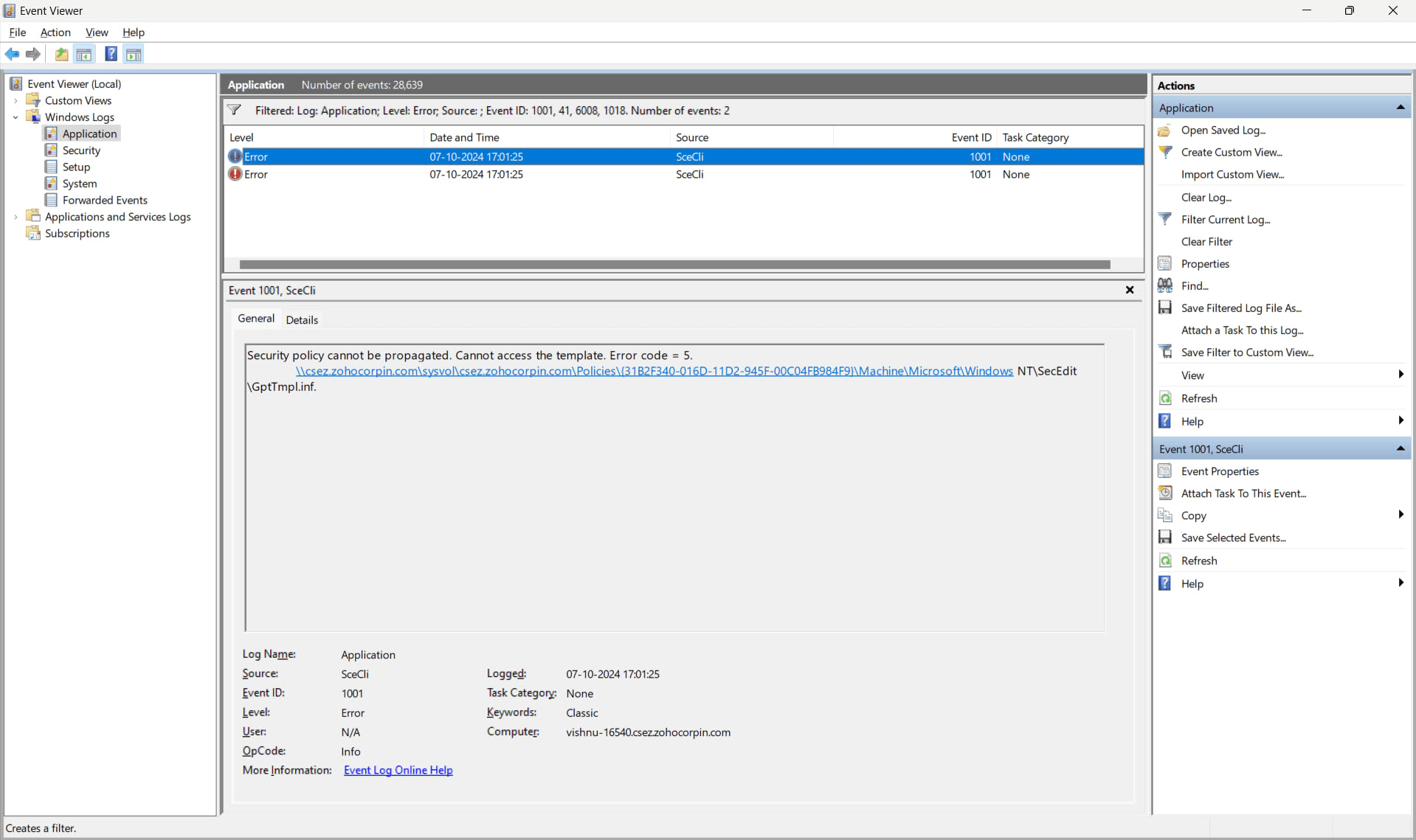
What you find narrows things dramatically:
| # | Event Viewer entry | What it points to |
|---|---|---|
| 1 | Display driver nvlddmkm/amdkmdap stopped responding | GPU driver, VRAM, or GPU-side instability |
| 2 | Application Error with a game module name | Game bug, corrupt files, or overlay hook |
| 3 | WHEA-Logger warnings or errors | Genuine hardware-level error, often memory or CPU |
| 4 | Kernel-Power event 41, no other entries | Abrupt power loss — PSU or thermal shutdown |
| 5 | Nothing at all logged | Hard reset before Windows could write — power or severe hardware |
| 6 | Application Hang rather than error | Deadlock, often driver or overlay related |
Rows 4 and 5 are a different investigation entirely. If your machine cuts out rather than crashing to desktop, start with why your PC shuts down while gaming — that is a power and thermal problem, not a software one.
The Six Causes, In Test Order
Work down this list. Each step is designed to be cheap and to eliminate a whole category.
1. Disable XMP / EXPO
Boot into BIOS and set memory to its default JEDEC speed. If the crash stops, you have found it. This is the most common cause of this exact symptom and costs nothing to test.
2. Close Every Overlay
Discord, Steam, GeForce, Armoury Crate, MSI Afterburner, capture software. Each hooks the render pipeline; stacked hooks are a well-documented crash source.
3. Log Your Sensors
Run HWiNFO with logging enabled and check GPU hotspot temperature, VRAM usage, and CPU package power at the moment of the crash.
4. Watch VRAM
If usage climbs steadily and the crash arrives shortly after it plateaus at maximum, you are running out of video memory.
5. Clean-Install the GPU Driver
Use DDU in Safe Mode, then install fresh. A driver upgraded in place over several versions is a genuine and common source of instability.
6. Remove All Tuning
Revert every overclock and undervolt, including the mild ones you think are safe. Especially the memory overclock.
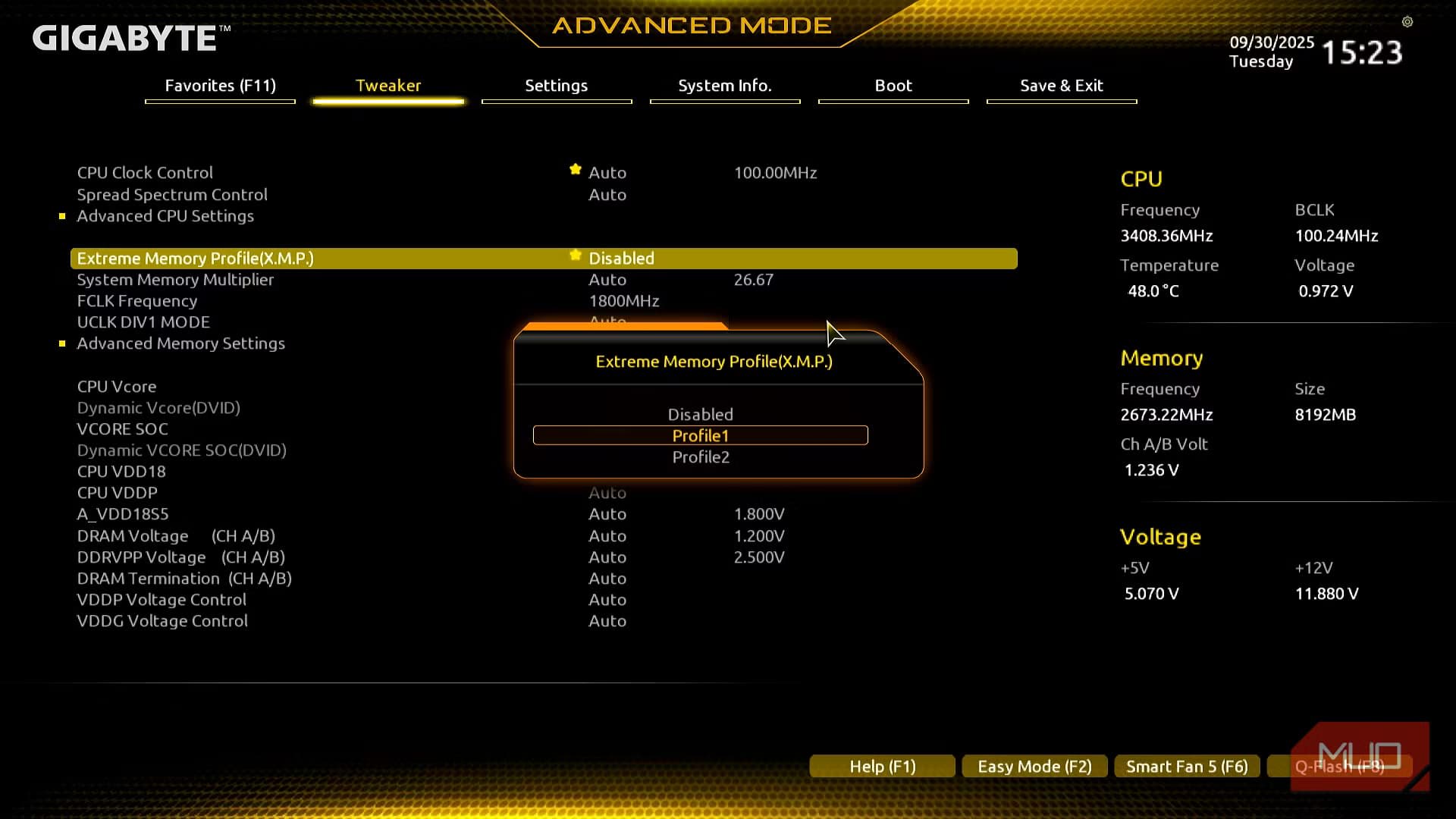
Step 1 in Detail: Memory Instability
XMP and EXPO profiles are factory overclocks. They are validated on the memory kit, not on your specific CPU's memory controller, and a profile that passes a quick boot test can still be marginal enough to fail only under a specific access pattern.
Games are unusually good at finding that pattern. They allocate, free, and re-access memory continuously across a large working set — much less uniform than a stress test's tight loop. This is why memory instability so often shows up as "crashes in games only, after a while."
Set memory to JEDEC defaults and play for a few sessions. If it is stable, you have your culprit and three options: run a lower-speed profile, loosen timings manually, or raise SoC/memory controller voltage slightly within safe limits. If you are running four sticks or a very high-capacity kit, expect to need one of those — the capacity question is worth reading alongside whether 32GB of RAM is overkill for gaming.
Step 4 in Detail: Running Out of VRAM
This one has a distinctive signature that is easy to recognise once you know it.
Frame rate is fine for the first ten or fifteen minutes. Then stutter begins, gradually rather than suddenly. Texture quality visibly degrades in some engines. Frame times become erratic. Then either the game crashes or the display driver resets.
That progression is memory pressure, not a fault. The game is streaming assets faster than it can evict them, VRAM fills, and the driver starts thrashing between video memory and system RAM across the PCIe bus. Eventually something gives.
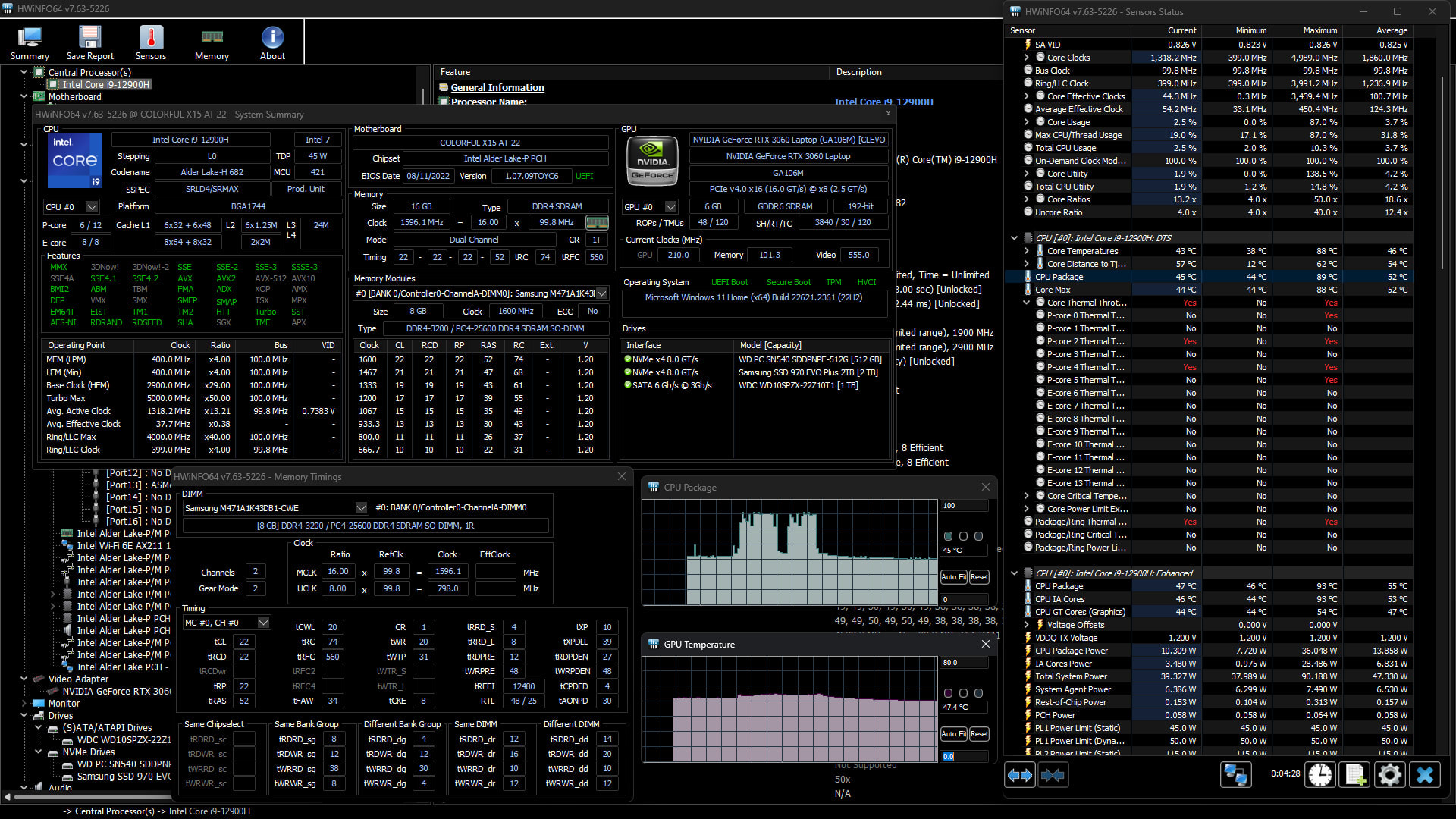
Confirm it by watching dedicated GPU memory usage in HWiNFO or the Task Manager performance tab during the run-up. If it climbs to your card's limit and stays there before the trouble starts, that is your answer. Drop texture quality one notch and re-test — if the crash disappears, it was never a stability problem at all. Our guide to how much VRAM you need for gaming covers what current titles actually consume at each resolution.
Warning
A second monitor consumes framebuffer memory too. On an 8GB card sitting close to its limit, adding a 4K secondary display can be enough to tip a stable configuration into this failure. Test with the second display disconnected — see why a second monitor costs you frames for the wider set of effects.
Thermal Causes That Stress Tests Hide
Temperature is the obvious suspect for a delayed crash, and it is worth checking properly rather than dismissively.
The reason a stress test can miss a thermal problem is that stress tests produce a steady thermal load, which lets a cooling system reach equilibrium. Games produce a cycling load, and repeated heating and cooling of a component with poor contact or degraded paste behaves differently from a single sustained ramp.
The specific number to watch on a modern GPU is hotspot temperature, not the core temperature the overlay usually shows. A large and growing gap between core and hotspot — say, more than 20°C — points to uneven contact between the die and the cooler, which typically means degraded thermal paste or a warped mounting. That failure produces exactly the profile you are seeing: fine at first, unstable once heat has had time to concentrate.
On the CPU side, watch package power alongside temperature. A chip that throttles cleanly does not crash; a chip whose power delivery is marginal under transient spikes can. If temperatures are fine but the system is dropping out abruptly rather than crashing to desktop, that is a power problem again — the shutdown guide linked above is the right place for it.
Software Causes People Overlook
Two categories deserve specific mention because they are common and rarely suspected.
Overlay stacking. Steam, Discord, GeForce, a vendor RGB utility, a capture tool, and a monitoring overlay all inject themselves into the game's render pipeline. Any one of them is usually fine. Four or five simultaneously, each hooking the same DirectX or Vulkan calls, is a well-documented source of crashes and hangs. Close all of them, confirm stability, then reintroduce one at a time.
Shader compilation and cache corruption. A crash that happens consistently at a particular point in a level, or reliably a few minutes after entering new content, can be shader-related rather than hardware-related. The standard advice about clearing shader caches is more nuanced than it looks — our guide to whether you should clear your shader cache covers when it genuinely helps and when it makes things worse. If the primary symptom is stutter rather than a crash, start with how to fix stuttering in PC games instead.
Tip
Change one thing at a time and write down what you changed. The reason this problem eats weekends is that people disable XMP, update drivers, close overlays and lower texture quality in one go, find it stable, and then never know which change mattered — so it comes back the next time they enable something.
When It Really Is the Hardware
Some of these crashes are genuine faults. The signals worth taking seriously:
WHEA-Logger entries in Event Viewer. These are hardware-level machine check errors reported by the CPU itself. They are not always fatal and not always the CPU's fault, but they mean something real went wrong at the silicon level rather than in software.
Failures that survive every software change. JEDEC memory, clean driver install, no overlays, no tuning, texture quality reduced, temperatures verified fine — and it still crashes at minute twenty. At that point testing components individually is justified.
MemTest86 errors. Any error at all on a stock memory configuration means a bad stick or a bad memory controller. Test sticks one at a time in the same slot to isolate.
Crashes that spread to non-gaming workloads. If a long file transfer, a video export, or a compile also fails, the game was never the problem.
Frequently Asked Questions
Why does my game crash but stress tests pass?
Because stress tests apply a constant load to one subsystem while games apply a rapidly varying load to all of them at once. Instability that depends on load transitions, memory access patterns, or gradual resource accumulation is invisible to a synthetic test that does none of those things.
What causes a crash exactly 20 minutes into gameplay?
The timing points to something that builds: heat concentrating in a poorly contacted component, VRAM filling as assets stream in, or memory instability that needs enough varied access to be triggered. A fixed, repeatable delay most often indicates thermal or memory-pressure accumulation rather than a random fault.
Should I disable XMP to fix game crashes?
It is the first thing to test, because it is free, reversible, and memory instability produces this exact symptom more often than any other cause. Set memory to JEDEC defaults, play a few sessions, and see whether the crashes stop before you investigate anything else.
Can running out of VRAM crash a game?
Yes. The usual progression is gradually worsening stutter and degraded texture quality followed by either a game crash or a display driver reset. Watch dedicated GPU memory usage during the run-up — if it pins at maximum before the trouble starts, lower texture quality and re-test.
Do overlays like Discord and Steam really cause crashes?
Individually, rarely. Stacked, yes. Each one hooks into the game's rendering path, and several simultaneous hooks into the same DirectX or Vulkan calls is a documented source of crashes and hangs. Close all of them, verify stability, then add them back one at a time.
What should I check in Event Viewer after a crash?
Windows Logs → Application and Windows Logs → System, filtered to the crash timestamp. A display driver timeout, an application error naming a game module, a WHEA-Logger entry and a bare Kernel-Power 41 each point at a completely different cause, so this single check saves you from investigating five things you did not need to.
The Bottom Line
The passing stress test is not evidence that your hardware is fine. It is evidence that your hardware survives a load pattern no game produces.
Read Event Viewer first, because it tells you which investigation to run. Then disable XMP, because memory instability causes this pattern more often than anything else and the test costs nothing. Then log your sensors during an actual crash, so that whatever you conclude next is based on what the system was doing rather than what you assume it was doing.
Most of the time it is one of those three steps. The people who spend a month on this are almost always the ones who skipped straight to reinstalling Windows.
If the crash arrives with an Unreal Engine fatal error naming a stalled thread rather than closing silently, hang detected on GameThread covers what that watchdog message actually means and which fixes apply.
System and software imagery courtesy of the respective manufacturers and publications, used for editorial coverage.
Sources
- Microsoft Learn, Troubleshoot TDR errors — Display driver stopped responding and has recovered, retrieved 2026-07-30, https://learn.microsoft.com/en-us/windows-hardware/drivers/display/timeout-detection-and-recovery
- Microsoft Q&A, Possible issue with GPU/VRAM but unable to identify the specific cause of PC crashes under load, retrieved 2026-07-30, https://learn.microsoft.com/en-us/answers/questions/3898838/possible-issue-with-gpu-vram-but-unable-to-identif
- Overclock.net, GPU crashes in games but not in stress tests, retrieved 2026-07-30, https://www.overclock.net/threads/gpu-crashes-in-games-but-not-in-stress-tests.1601093/
- Windows Report, How to Fix GPU Memory Leak Issues for Windows Games, retrieved 2026-07-30, https://windowsreport.com/gpu-memory-leak/
- Tom's Hardware Forum, GPU using more VRAM than it has (VRAM leak?), retrieved 2026-07-30, https://forums.tomshardware.com/threads/gpu-using-more-vram-than-it-has.3426511/