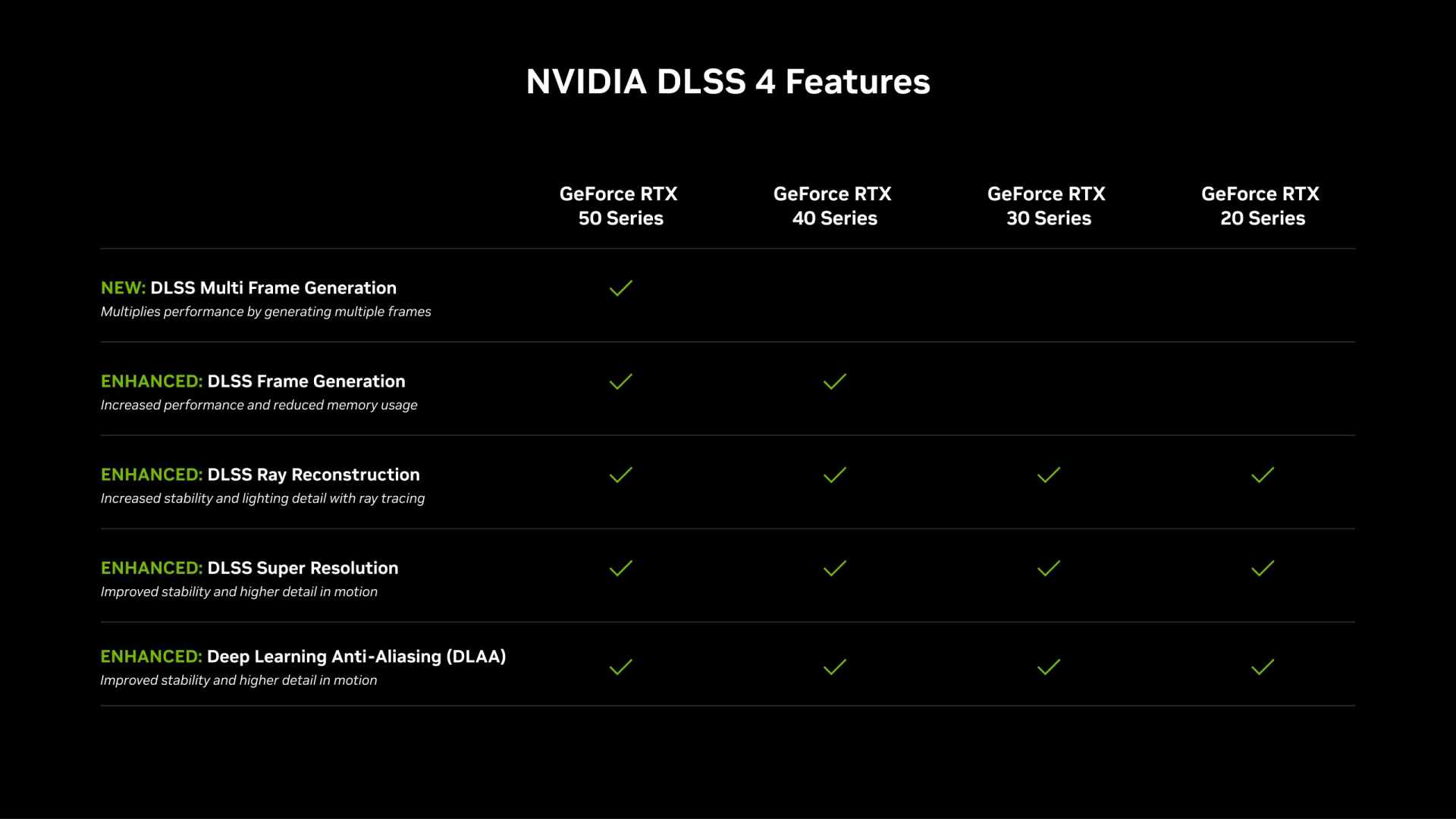
Frame generation adds input lag, and the amount is smaller and stranger than the argument around it suggests. With NVIDIA Reflex active, published measurements put the cost at roughly 8 to 12 milliseconds in most games — and critically, that penalty does not grow as you raise the multiplier from 2x to 4x or higher.
That second fact is the one almost nobody knows, and it changes how you should think about the setting entirely. The latency cost is a fixed toll you pay at the gate, not a meter that runs faster the more frames you generate.
Note
Key Takeaways
- Frame generation adds roughly 8–12 ms of end-to-end latency in most games with Reflex enabled, against a 15–30% increase versus native without it.
- The latency penalty is essentially fixed. Going from 2x to 4x multi-frame generation raises the frame counter without materially raising the lag.
- Base frame rate is what matters. Below roughly 50–60 FPS before generation, the added latency becomes noticeable and artefacts get worse.
- Reflex is mandatory with DLSS frame generation precisely because it claws back CPU-side queueing latency to offset the cost.
- It is excellent for single-player games on high-refresh displays and wrong for competitive shooters, where the 8–12 ms is not worth the visual smoothness.
- Generated frames do not carry new input. A 240 FPS counter with a 60 FPS base still responds like 60.
What Frame Generation Actually Does
Frame generation renders two real frames, then constructs one or more intermediate frames between them using motion vectors and AI models, and displays the generated frames in the gap. The GPU is not rendering the in-between frames from the game engine — it is inferring what they would look like.
That mechanism is why latency increases at all. To insert a frame between frame A and frame B, the system must already hold frame B before it can show anything between them. Frame A is therefore delayed slightly, and that delay is the fundamental cost.
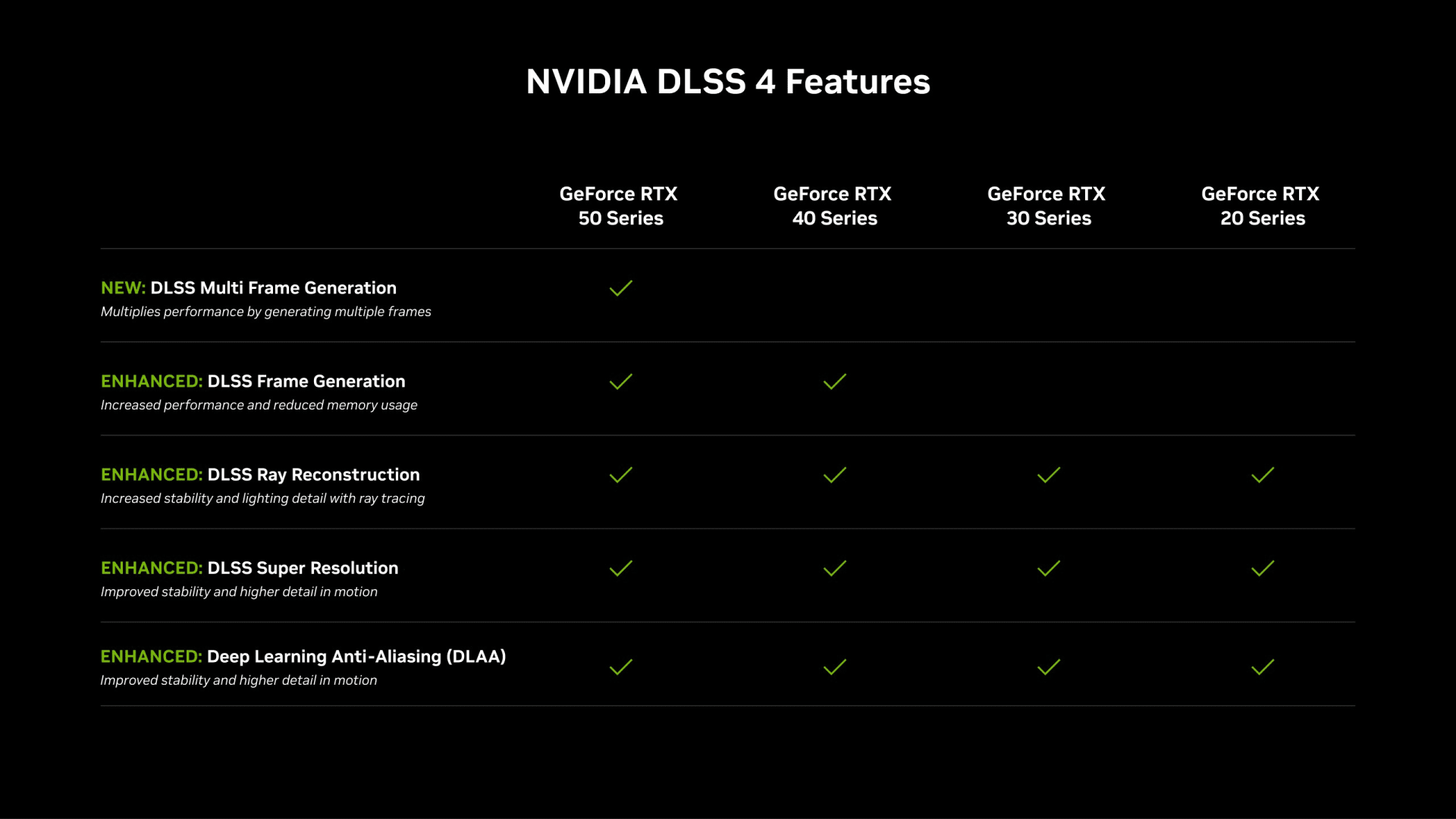
Everything else follows from this. Generated frames are visual only — they contain no new input sampling, no new game state and no new simulation step. They make motion look smoother without making the game respond faster.
Why the Penalty Does Not Scale With the Multiplier
Here is the counterintuitive part. Once the system is holding frame B in order to generate anything at all, generating three intermediate frames instead of one costs almost no additional waiting.
The buffer requirement is the same. The interpolation work is more expensive computationally, but it happens inside a window that already exists. Published testing has found the added latency ceiling stays fixed as the multiplier rises from 2x through 4x and beyond.
Practical consequence: if you have decided the latency cost is acceptable, use the highest multiplier your display can show. There is no latency reason to run 2x instead of 4x on a 240 Hz panel.
The Actual Numbers
With Reflex on, frame generation lands around 8–12 ms of additional end-to-end latency in most titles. Without a low-latency mode, the increase is closer to 15–30% over native, and worst-case scenarios have been measured around 50 ms.
| Configuration | Typical added latency | When it matters |
|---|---|---|
| Native, Reflex on | Baseline | — |
| Frame gen 2x + Reflex | ~8–12 ms | Barely perceptible in single-player |
| Frame gen 4x + Reflex | ~8–12 ms | Same as 2x — the toll is fixed |
| Frame gen, no low-latency mode | 15–30% over native | Noticeable, avoidable |
| Frame gen from a low base (under 40 FPS) | Worst case, up to ~50 ms | Clearly felt — do not do this |
For scale: 8–12 ms is roughly the difference between a 120 Hz and a 60 Hz display's frame interval. It is real, and in a single-player game most people cannot identify it blind.
Info
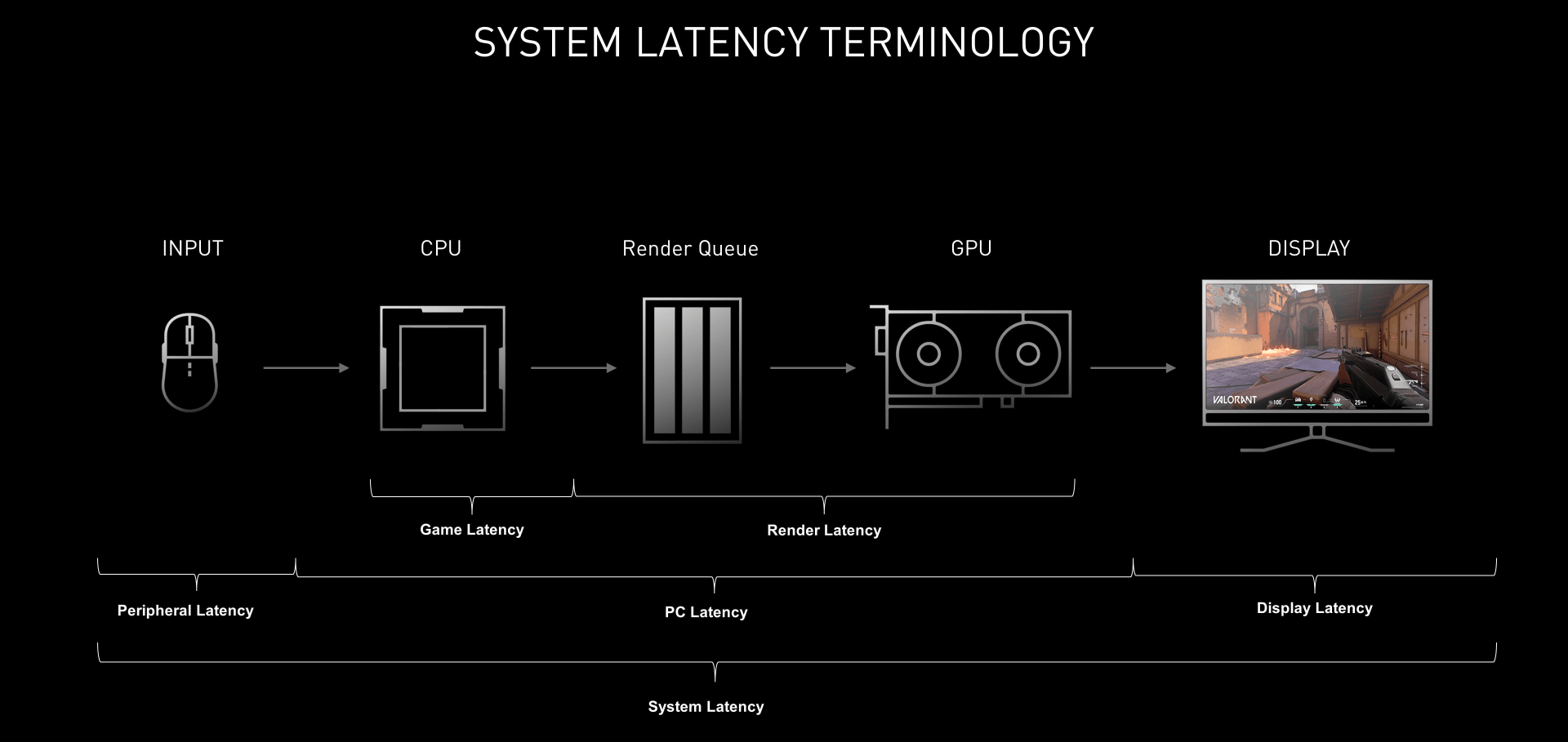
End-to-end latency is the full chain: mouse click, CPU simulation, render queue, GPU render, display scanout. Frame generation only touches one link in it. This is why a 12 ms addition to a 45 ms pipeline is a smaller proportional change than the headline number suggests — and why fixing a slow display or a bloated render queue often matters more.
Base Frame Rate Is the Only Rule That Matters
Frame generation multiplies whatever you give it, including the problems. Its behaviour is entirely determined by the frame rate you were getting before you enabled it.
Above 60 FPS Base: Enable It
At a 60+ FPS base, the interval between real frames is short enough that interpolation has good data to work with. Artefacts around fast-moving UI elements and thin geometry are minimal, and the 8–12 ms latency addition sits well inside the range most people cannot detect in a single-player game.
This is the case frame generation was designed for: taking a solid 70 FPS on a 144 Hz or 240 Hz display and filling the panel.
Between 40 and 60 FPS Base: It Depends
This is the grey zone. The visual smoothness gain is largest here — going from 45 to 90 on the counter feels transformative — but the added latency is layered on top of an already-slow base.
The honest test is the one you can run yourself: play ten minutes with it on, ten minutes with it off, and notice which one you stopped thinking about.
Below 40 FPS Base: Turn It Off
Below roughly 40 FPS, frame generation makes things worse in every way that matters. The gap between real frames is long enough that interpolation guesses badly, producing visible warping around moving objects. The base latency is already high, and the addition compounds it.
Fix the base frame rate first. Our guides to fixing stuttering in PC games and why 1% lows matter more than average FPS cover the right order of operations.
Reflex Is Not Optional
DLSS frame generation requires NVIDIA Reflex to be enabled, and that is a design decision rather than a limitation. Reflex reduces CPU-side render queue latency, which partially offsets the cost frame generation introduces.
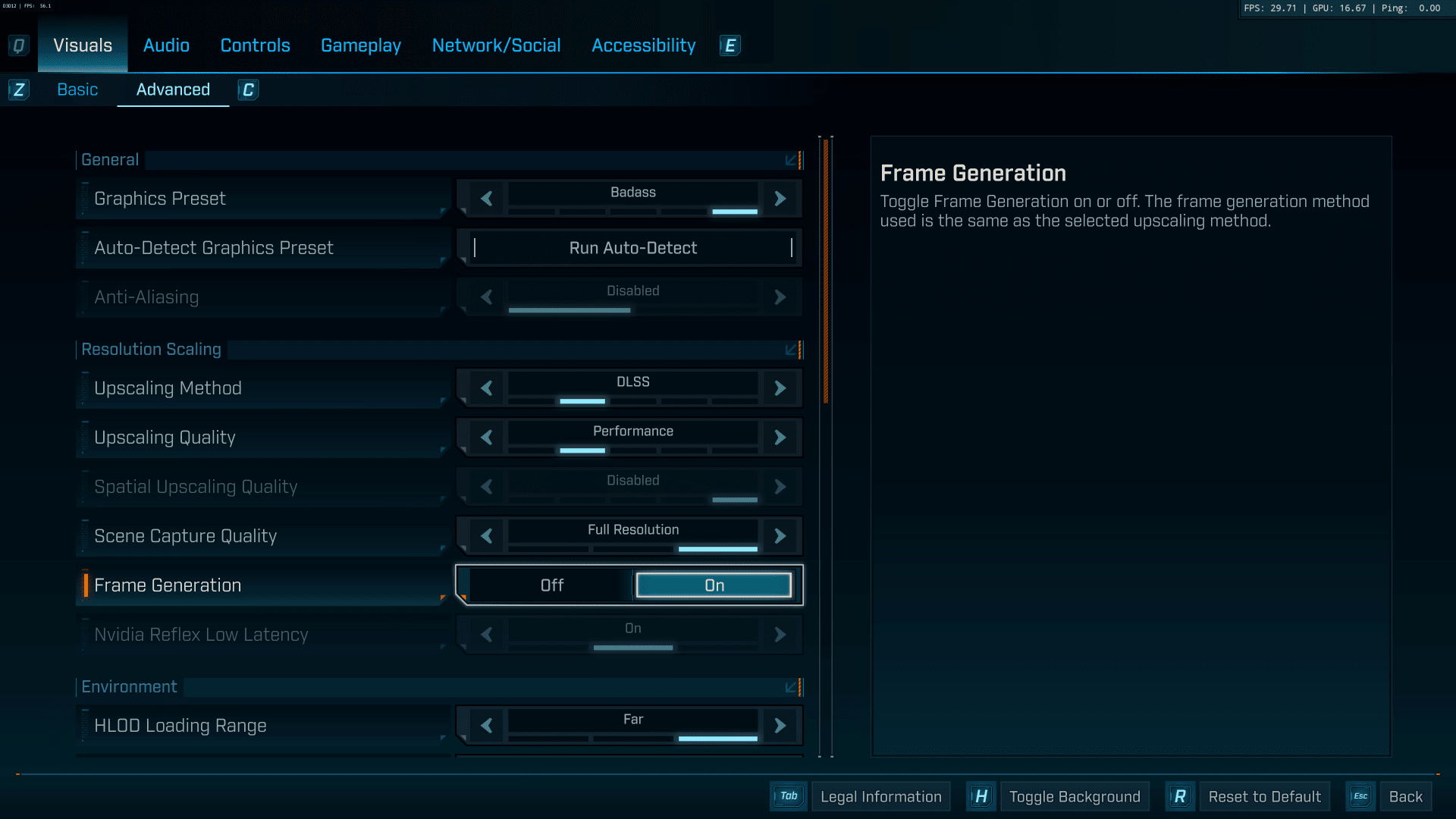
The result is that a frame-generated image with Reflex on can measure lower total latency than the same game running natively with no low-latency mode and a deep render queue. That is not a trick — it is two different parts of the pipeline being adjusted in opposite directions.
AMD's equivalent path pairs frame generation with Anti-Lag, and Intel's with its own low-latency mode. The principle is identical across vendors.
Always On
Reflex or your vendor's low-latency equivalent. Non-negotiable with frame generation enabled.
Cap Below Refresh
Set a frame cap 2–3 FPS below your panel's maximum so the generated output stays inside the VRR window instead of bouncing off the V-Sync ceiling.
Match Multiplier to Panel
Use the highest multiplier your refresh rate can display. The latency toll does not grow with it.
Check Base First
If the pre-generation frame rate is under 50, fix that before touching this setting.
When to Turn Frame Generation Off
Competitive shooters, full stop. In a game where you are reacting to a peeking opponent, 8–12 ms is a meaningful share of your reaction budget, and visual smoothness buys you nothing you can act on. Players who care enough to run 8000 Hz polling rates are chasing latency in single-digit milliseconds — enabling frame generation undoes that work several times over.
Games with heavy UI or text overlays. Interpolation struggles with elements that move independently of the 3D scene. Strategy games, MMOs with dense HUDs and anything with a lot of on-screen text tend to show artefacts around those elements.
When your base frame rate is already at your refresh rate. There is nothing to fill. You are paying latency for frames the panel cannot display.
When you are chasing a specific latency target. If you are tuning a setup for responsiveness, frame generation is the first thing to disable, not the last.
Frame Generation and VRR
Generated frames still have to fit inside your variable refresh window, and getting this wrong produces the exact stutter you enabled the feature to avoid. Set a frame cap 2–3 FPS below your panel's maximum refresh so the output stays in VRR range rather than hitting the ceiling and falling back to V-Sync behaviour.
On OLED panels there is an additional wrinkle: large, rapid frame rate swings can trigger visible brightness flicker. Frame generation reduces that risk by smoothing the delivered rate, but it does not eliminate it — our guide to VRR flicker on OLED monitors covers the fix.
Response time also caps what you gain. If your panel's pixel transitions are slow, generated frames arrive faster than the display can distinguish them, and the perceived benefit shrinks. That relationship is explained in our breakdown of GtG versus MPRT response times, and monitor overdrive and ghosting covers the setting that most often undermines it.
Frequently Asked Questions
How much input lag does frame generation add?
Roughly 8 to 12 milliseconds in most games with NVIDIA Reflex enabled. Without a low-latency mode active, the increase is closer to 15–30% over native rendering, and worst-case scenarios have been measured around 50 ms. The penalty does not grow as you raise the frame generation multiplier.
Does 4x frame generation add more lag than 2x?
No, not materially. The added latency ceiling is essentially fixed regardless of multiplier, because the system already has to hold the next real frame to generate anything at all. If you have accepted the latency cost, use the highest multiplier your display can show.
Should I use frame generation in competitive games?
No. In competitive shooters the 8–12 ms cost is a meaningful share of your reaction time, and generated frames carry no new input, so the extra smoothness gives you nothing actionable. Disable it and run native with a low-latency mode instead.
What base frame rate do I need for frame generation to feel good?
Aim for 60 FPS or higher before enabling it. Between 40 and 60 the result is playable but noticeably softer in response. Below 40, interpolation has too little data to work with and produces visible artefacts on top of already-high latency — fix the base frame rate first.
Do generated frames respond to my mouse input?
No. Generated frames are visual interpolations between two real frames and contain no new input sampling or game simulation. A 240 FPS counter built from a 60 FPS base still responds to your mouse like a 60 FPS game.
Is frame generation the same as upscaling?
No. Upscaling renders at a lower internal resolution and reconstructs a higher-resolution image, which genuinely reduces GPU work and lowers latency. Frame generation inserts additional frames between rendered ones, which increases smoothness and slightly increases latency. They are frequently used together but do different jobs.
The Bottom Line
Frame generation adds latency, the amount is around 8–12 ms with Reflex on, and it does not get worse as you raise the multiplier. That is the whole technical story, and it is far less dramatic than the discourse around it.
Use it in single-player games when your base frame rate is already 60 or above and your display has refresh headroom to fill. Turn it off in competitive shooters and any time your base rate is below 50. Enable Reflex without exception, cap 2–3 FPS below your panel's maximum, and pick the highest multiplier your monitor can actually show.
Treat it as a smoothness setting, not a performance setting. It cannot fix a game that runs badly — it can only make a game that already runs well look better.
Diagrams and screenshots courtesy of NVIDIA and the respective publications, used for editorial coverage.
Sources
- NVIDIA, DLSS 4.5 Dynamic Multi Frame Generation 6X mode released, retrieved 2026-08-09, https://nvidia.com/en-us/geforce/news/dlss-4-5-dynamic-multi-frame-generation-6x-mode-released
- HotHardware, NVIDIA DLSS 4.5 Tested: The Real-World Impact Of Dynamic Multi-Frame Generation, retrieved 2026-08-09, https://hothardware.com/news/nvidia-dlss-45-dynamic-mfg-tested
- TechFuel HQ, Frame Generation Explained: DLSS 4, FSR & AFMF (2026), retrieved 2026-08-09, https://techfuelhq.com/articles/frame-generation-explained-2026/
- ArsenalPC, DLSS 4 Multi Frame Generation Explained: Real Benchmarks and the Fake Frames Debate, retrieved 2026-08-09, https://arsenalpc.com/dlss-4-multi-frame-generation-explained-real-benchmarks-fake-frames-debate-and-what-it-means-for-your-rtx-50-series-build/
- Yahoo Tech, Hands On With Nvidia DLSS 4.5 Dynamic Multi-Frame Generation, retrieved 2026-08-09, https://tech.yahoo.com/gaming/articles/hands-nvidia-dlss-4-5-130000865.html