GtG measures how fast a pixel changes colour. MPRT measures how long you see it. Those are different quantities, and a monitor can be world-class at one while being ordinary at the other — which is exactly how a display with a 0.03ms response time still shows visible motion blur.
The number that determines how blurry motion looks is almost never the one printed on the box. Once you know which is which, monitor specifications become a great deal easier to read.
Note
Key Takeaways
- GtG (grey-to-grey) is the pixel's transition time. MPRT (moving picture response time) is how long the image stays lit in front of your eye.
- On a normal sample-and-hold display, MPRT is roughly your frame time — 16.7ms at 60Hz, 6.9ms at 144Hz, 4.2ms at 240Hz.
- That is why an OLED with a 0.03ms GtG at 60Hz still blurs. The pixel changed instantly; it then sat there for 16.7ms.
- "1ms MPRT" almost always means backlight strobing, which costs brightness and usually cannot run alongside VRR.
- GtG does not need to be fastest. It needs to be faster than your frame time, so transitions finish before the next frame.
- The genuinely effective fix for motion blur is higher refresh rate with the frame rate to feed it.
Two Different Measurements
Start with what each one physically describes, because the names give almost no help.
GtG times how long a liquid crystal takes to shift from one shade of grey to another. It is a property of the panel's chemistry and its overdrive circuit. Manufacturers usually quote the fastest transition they can find, typically at maximum overdrive, which is not representative of the average transition and often introduces the overshoot artefacts covered in monitor overdrive settings.
MPRT measures something entirely different: how long a given frame remains visible. It is a persistence figure, and on an ordinary display it has almost nothing to do with the panel's chemistry.
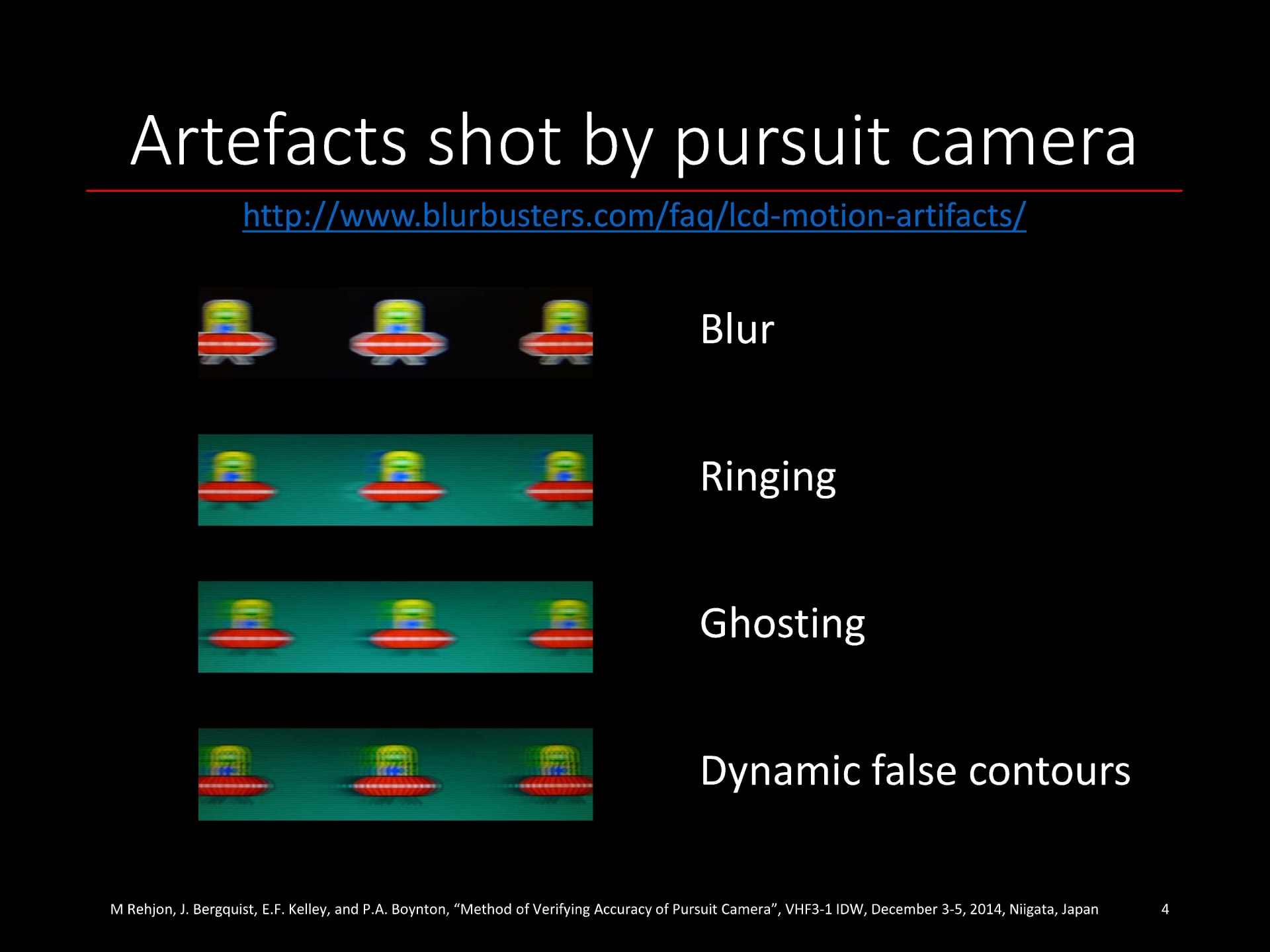
The confusion exists because both are quoted in milliseconds and both are called "response time." They are not comparable numbers, and a monitor listing "1ms" without saying which is telling you nothing.
Why Persistence Causes Blur
This is the mechanism, and it is not intuitive, because the blur has nothing to do with the display being slow.
Nearly every modern monitor is sample-and-hold: it displays each frame continuously until the next one replaces it. At 60Hz, a frame is held on screen for 16.7 milliseconds without changing.
Now track a moving object with your eyes. Your eye moves smoothly and continuously, but the image on the panel is frozen for the whole frame. Over those 16.7ms your eye has travelled while the object has not, so the object's light is smeared across your retina. Your eye creates the blur, not the monitor.
The consequence is worth stating plainly: a perfectly instantaneous display would still blur on a sample-and-hold panel. OLED demonstrates this every day. Its pixels switch in a fraction of a millisecond, and OLED gaming monitors still exhibit persistence blur at any given refresh rate, because the frame is still held for a full frame time.
Info
Blur Busters' widely cited rule of thumb makes this concrete: roughly 1ms of persistence produces 1 pixel of motion blur for every 1000 pixels per second of motion. At 60Hz, an object crossing the screen at 1000 px/s smears across about 16 pixels. At 240Hz, about 4.
The Numbers That Follow From This
Because MPRT on a sample-and-hold display is essentially frame time, you can calculate it. No measurement required.
| Refresh rate | Frame time / MPRT | Relative blur |
|---|---|---|
| 60Hz | 16.7ms | Baseline |
| 120Hz | 8.3ms | Half |
| 144Hz | 6.9ms | ~2.4× less |
| 240Hz | 4.2ms | ~4× less |
| 360Hz | 2.8ms | ~6× less |
| 480Hz | 2.1ms | ~8× less |
Two things fall out of this table immediately.
Refresh rate is the blur control. Doubling refresh rate halves persistence, which halves motion blur. Nothing else on a spec sheet does that.
You must actually reach the frame rate. A 240Hz monitor fed 90 FPS is showing you frames for 11ms each, not 4.2ms. The panel's capability is irrelevant if the GPU cannot fill it — which makes frame rate consistency part of the picture, and the reason 1% lows matter more than average FPS for perceived smoothness. It is also worth confirming the signal path can carry the refresh rate you paid for before blaming the panel, which is where the bandwidth tiers in DisplayPort 2.1 vs HDMI 2.1 come in.
Where "1ms MPRT" Comes From
If MPRT equals frame time, how does a 144Hz monitor claim 1ms MPRT when its frame time is 6.9ms?
By turning the backlight off for most of the frame.
Backlight strobing — sold as ULMB, DyAc, ELMB, MBR or a dozen other acronyms — flashes the backlight briefly and leaves it dark for the rest of the frame time. If the light is on for only 1ms of a 6.9ms frame, the image is only in front of your eye for 1ms, and persistence blur drops accordingly. On OLED the equivalent is black frame insertion.
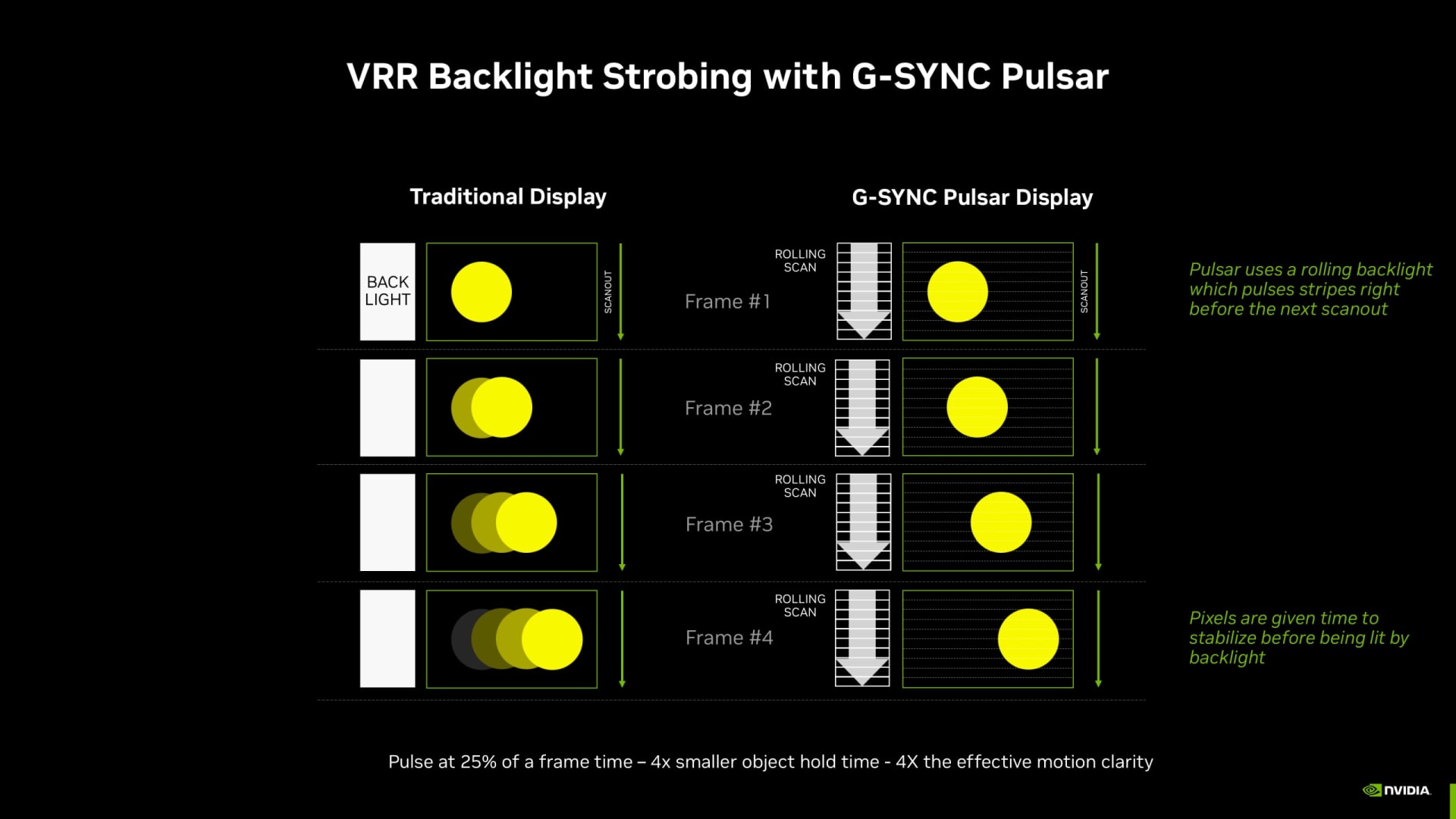
It genuinely works. Motion clarity with a well-implemented strobe is dramatically better than without, and it is the closest a modern flat panel gets to CRT-like motion. But it is not free:
Brightness falls substantially. The backlight is off most of the time, so peak brightness drops — commonly to half or less. In a bright room this alone rules it out.
It usually cannot run with VRR. Strobing requires a fixed, predictable refresh interval to time the flashes. Most implementations disable adaptive sync, which means you trade tearing and stutter for clarity. A handful of displays support both; most do not.
Some people see flicker. A strobing backlight is, by definition, flickering. At high refresh rates most viewers do not consciously perceive it, but a minority get eye strain or headaches — and it is a separate phenomenon from the VRR flicker on OLED monitors that arises from gamma shifts.
Strobe crosstalk. Imperfect timing produces faint double images, usually worst at the top and bottom of the screen.
Warning
A spec sheet listing "1ms MPRT" with no mention of strobing is quoting a mode you have to opt into, at a cost you have to accept. Treat it as a feature the display has, not as a description of how it behaves out of the box.
So Does GtG Matter At All?
Yes — but as a threshold, not as a race.
GtG needs to be comfortably shorter than your frame time. If a transition takes longer than one frame, the pixel is still changing when the next frame arrives, and you get smearing and trailing on top of persistence blur. That is a real, visible defect and it is what people mean by ghosting.
60Hz — 16.7ms frame time
Almost any modern panel finishes in time. GtG is a non-issue here.
144Hz — 6.9ms frame time
Average GtG under about 5ms keeps transitions inside the frame. Most decent IPS panels manage this.
240Hz — 4.2ms frame time
Now GtG matters. Panels with average transitions above 4ms will visibly smear, which is why fast IPS, TN and OLED dominate this tier.
360Hz and above — under 2.8ms
Only the fastest LCD technologies and OLED reliably complete transitions in time.
OLED — around 0.03ms
Never the limiting factor at any refresh rate. Its blur is entirely persistence.
The key insight: once GtG is fast enough, faster GtG buys you nothing. Going from 3ms to 1ms on a 144Hz display changes nothing you can see, because both finish well inside the 6.9ms frame. The marketing arms race over GtG numbers is largely a race past the point of relevance.
This is also why a manufacturer's quoted GtG is nearly useless. It is a best-case transition at maximum overdrive. What you want is the average transition across many grey levels at a sensible overdrive setting, which is what independent monitor reviewers measure and manufacturers do not publish.
How to Judge a Monitor's Motion Yourself
You do not need equipment to get a useful answer.
Run the UFO pursuit test. Blur Busters' TestUFO in a browser is the standard tool. Follow the moving object with your eyes rather than staring at a fixed point — pursuit is the whole point, since it is your eye's motion that creates persistence blur.
Compare refresh rates on the same panel. Set 60Hz, run the test, then set your maximum and run it again. The difference is persistence, isolated cleanly, on hardware you already own.
Check overdrive settings one at a time. Excessive overdrive produces bright halos trailing moving objects — inverse ghosting. The correct setting is the highest one with no visible overshoot, and the full procedure is in our monitor overdrive guide.
Toggle strobing if you have it. Set a fixed refresh rate first, since it will likely disable VRR anyway, and judge whether the clarity gain is worth the brightness loss in your room.
Trust reviews that publish response time heatmaps. A grid of measured transitions across grey levels tells you far more than any single figure.
One caution while you are testing: not everything that looks like blur is blur. Inconsistent frame delivery reads as smearing to most people, and so does input latency further up the chain — the measurable side of which is covered in is an 8000Hz polling rate worth it. Confirm your frame rate is steady before you judge the panel.
Frequently Asked Questions
What is the difference between GtG and MPRT?
GtG measures how long a pixel takes to change from one shade to another — a property of the panel. MPRT measures how long a frame remains visible to your eye, which on a normal display is essentially the frame time. GtG causes smearing when it is too slow; MPRT causes motion blur regardless of how fast the pixels are.
Why does my 1ms monitor still show motion blur?
Because "1ms" is almost certainly a GtG figure, and GtG is not what causes most motion blur. On a sample-and-hold display each frame is held for a full frame time — 6.9ms at 144Hz — and your eye smears that stationary image as it tracks movement. Only higher refresh rates or backlight strobing shorten it.
Is MPRT or GtG more important for gaming?
MPRT describes what you actually see, so it is the more meaningful figure — but you cannot buy it directly, because on a normal display it is set by refresh rate. In practice: buy the highest refresh rate you can drive, and check that GtG is comfortably below that frame time so transitions complete in time.
Does OLED eliminate motion blur?
No. OLED effectively eliminates GtG smearing, with transitions around 0.03ms, but it does not change persistence. An OLED at 120Hz holds each frame for 8.3ms just as an LCD does, and produces comparable persistence blur. OLED's motion advantage is the absence of smearing and overshoot, not the absence of blur.
Should I use backlight strobing or ULMB?
If you play at a fixed high frame rate in a dim room and value motion clarity above all else, yes. It genuinely delivers the clearest motion available on a flat panel. Expect to lose half your brightness and, on most displays, to lose variable refresh rate at the same time.
What GtG do I need for a 240Hz monitor?
Average transitions should finish inside the 4.2ms frame time, so you want a panel whose measured average is comfortably under 4ms rather than one whose best-case marketing figure is 1ms. Fast IPS, TN and OLED all clear this; slower VA panels frequently do not, particularly on dark transitions.
The Bottom Line
Two numbers, two different jobs. GtG has to be fast enough to finish inside a frame, and beyond that it stops mattering. MPRT is how long you see each frame, and on any normal display that is simply your refresh rate expressed differently.
Which makes the buying advice much simpler than the spec sheets suggest: buy refresh rate, then confirm the panel's measured average GtG comfortably beats the frame time. Ignore the headline "1ms" entirely — it is either a best-case GtG that every competitor also achieves, or an MPRT that requires a strobing mode you may never turn on.
And make sure you can actually feed the panel. A 360Hz display running at 110 FPS is delivering 240Hz-class blur at best, no matter what the box says.
Display and interface photography courtesy of the respective manufacturers and publications, used for editorial coverage.
Sources
- Blur Busters, GtG versus MPRT: Two Different Pixel Response Benchmarks, retrieved 2026-08-03, https://blurbusters.com/gtg-versus-mprt-frequently-asked-questions-about-display-pixel-response/
- Blur Busters, Motion Blur Reduction and the persistence equation, retrieved 2026-08-03, https://blurbusters.com/faq/motion-blur-reduction/
- TFTCentral, Response time measurement methodology and overdrive testing, retrieved 2026-08-03, https://tftcentral.co.uk/articles/response_time_testing
- VESA, ClearMR display motion performance certification, retrieved 2026-08-03, https://vesa.org/vesa-display-performance-standards/
- RTINGS, Motion blur and response time explained, retrieved 2026-08-03, https://www.rtings.com/monitor/tests/motion/motion-blur-response-time