Controller stick drift is caused by physical wear inside the stick module, not software. A metal wiper drags across a carbon resistive track every time you move the stick, and after roughly 300 hours of play that track wears down enough to send false inputs. Cleaning helps temporarily. The only permanent fix is replacing the module — and a Hall effect replacement costs about $15 and never wears out.
That is the part most guides bury. Recalibration, firmware updates and deadzone tweaks are all worth trying because they are free and instant, but understand what you are doing: you are working around worn hardware, not repairing it.
Note
Key Takeaways
- Drift is mechanical wear on a potentiometer's carbon track, typically after ~300 hours of use.
- Sony replaces DualSense controllers with drift free within 12 months — check warranty before opening anything.
- Cleaning with isopropyl alcohol buys weeks to months, not a permanent fix.
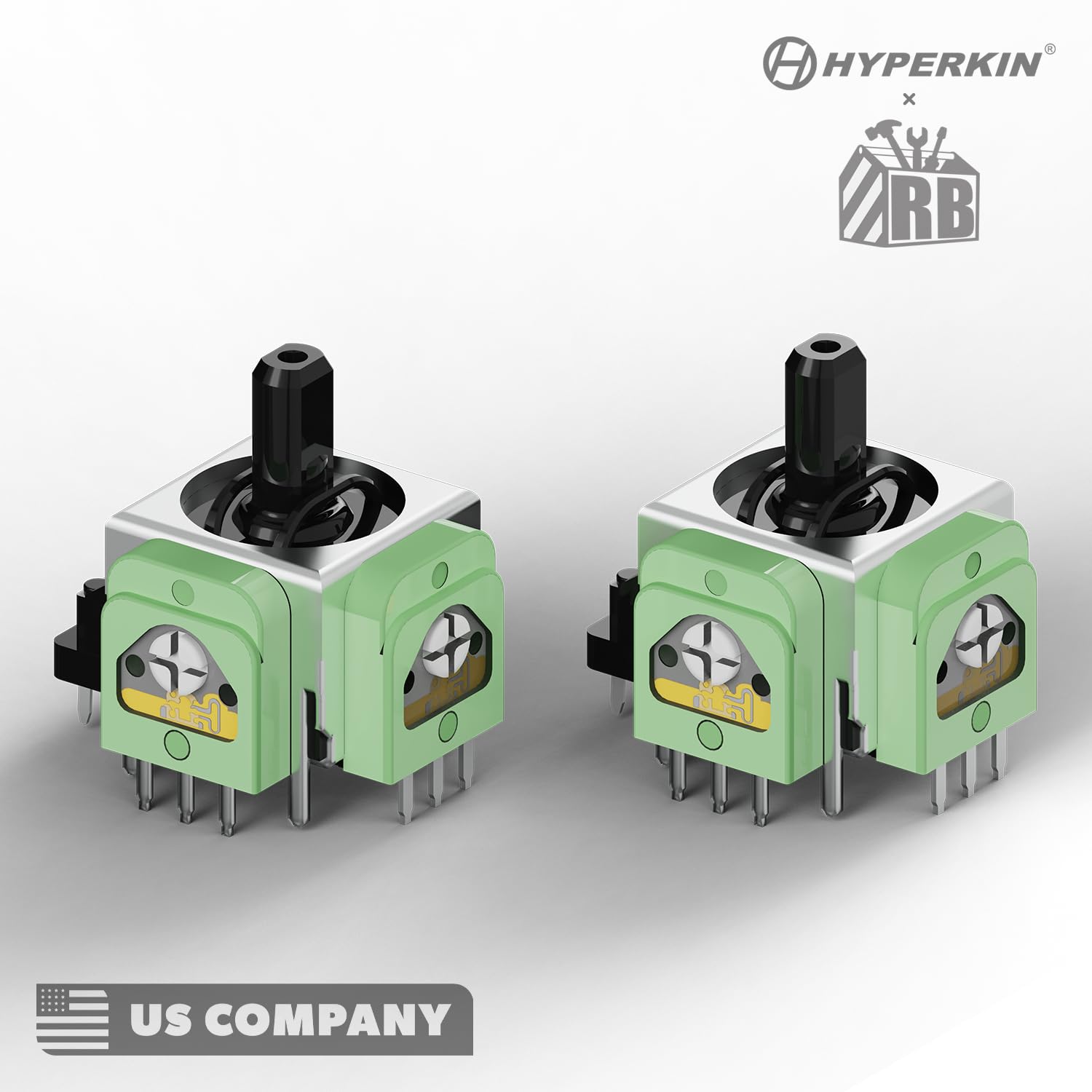
- Hall effect modules (~$15) use magnetic sensing with no physical contact and last roughly ten times longer.
- Increasing the in-game deadzone masks drift instantly and costs you aiming precision.
What Actually Causes Stick Drift?
Standard controller sticks use potentiometers — components with a metal wiper that physically drags across a resistive carbon track to report position. Every stick movement creates friction, and friction removes material.
Once the track is worn, the wiper reads an inconsistent resistance even at rest. The controller interprets that noise as genuine input, and your character walks off on their own.

Dust accelerates it. Contamination gets between the wiper and the track, scratches it, and turns gradual wear into fast wear. This is why drift often appears suddenly after a period of heavy use rather than creeping in evenly.
Warning
Drift is a wear-out failure, not a defect in most cases. Any controller using potentiometer sticks will eventually drift with enough use — this is a design limitation of the component, which is why Hall effect replacements exist. Expecting a potentiometer controller to last forever is expecting a consumable to be permanent.
Fix 1: Check Your Warranty First
Before you open anything, check whether someone else will fix it for free.
Sony offers free DualSense replacements for joystick drift within the first 12 months of purchase, covering drift that develops under normal use. Microsoft operates a comparable warranty process for Xbox controllers.
Opening the controller voids this warranty immediately. If your controller is under a year old, file the claim and skip every other fix in this guide.
Fix 2: Recalibrate and Update Firmware
Free, instant, and occasionally effective — worth trying before anything invasive.
On PS5: Settings → Accessories → Controller (General) → check for firmware updates. There is also an Adjust Analog Stick Deadzone option on newer system software.
On Xbox: use the Xbox Accessories app to update firmware and run stick calibration.
On PC: open Set up USB game controllers from the Start menu, select your controller, and run the calibration wizard.
If recalibration fixes it completely, the drift was a software-side offset rather than physical wear, and you have got lucky. That is uncommon but it costs nothing to check.
While you are in the console or PC settings, it is worth ruling out unrelated causes of erratic input — our guide to fixing stuttering in PC games covers frame-pacing problems that can feel like input lag but have nothing to do with the controller.
Fix 3: Increase the Deadzone
The deadzone is the range of stick movement your game ignores. Widening it makes minor drift invisible.
Many games expose a deadzone slider in their control settings. Steam users can set it per-game through Steam Input under controller configuration.
Precision Goes First
A larger deadzone means small stick movements do nothing. In shooters this directly degrades fine aim adjustment.
It Is a Moving Target
As wear continues you will need to keep increasing it. That escalation is the signal that you are masking, not fixing.
Fine for Some Genres
In driving games or platformers, a wider deadzone is barely noticeable. In competitive shooters it is a real handicap.
Fix 4: Clean the Stick Module
Cleaning removes contamination from between the wiper and the track. It works when dust is the immediate cause and does nothing when the track is genuinely worn through.
- Get 99% isopropyl alcohol and a thin applicator or spray straw.
- Pull the thumbstick cap off the affected stick.
- Apply a small amount of alcohol into the gap at the base of the stick mechanism.
- Rotate the stick through its full range 30 to 40 times to work the alcohol across the track.
- Let it dry completely — at least 15 minutes — before reconnecting power.
Tip
Use 99% isopropyl alcohol, not lower concentrations and not contact cleaner containing lubricants. Anything below about 90% carries too much water, and lubricants attract exactly the dust that caused the problem. Never use compressed air here — it drives contamination further into the mechanism instead of removing it.
Expect this to buy weeks or months. If the drift returns quickly, the carbon track is worn and you have confirmed you need a replacement module.
Fix 5: Replace the Stick Module
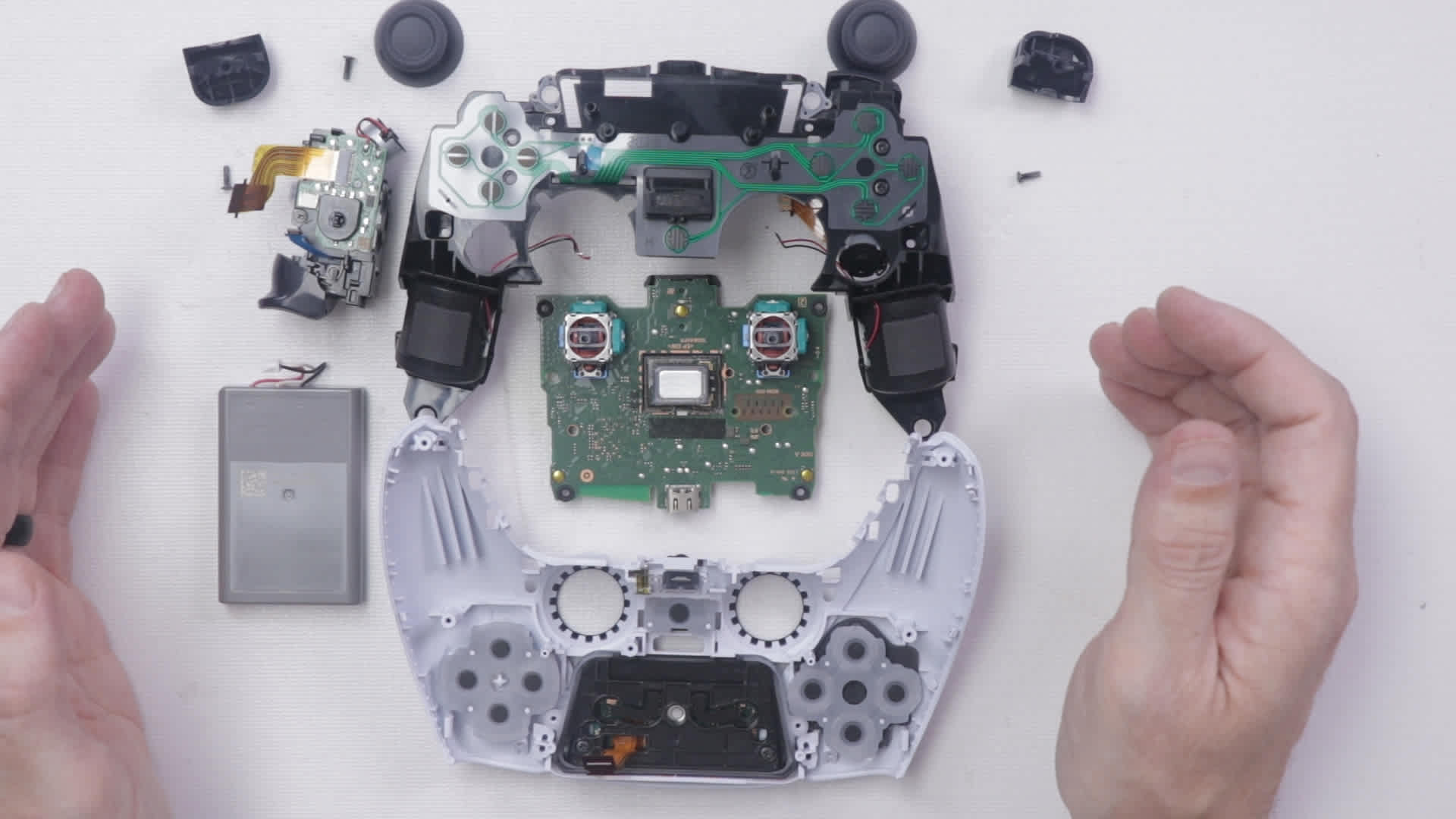
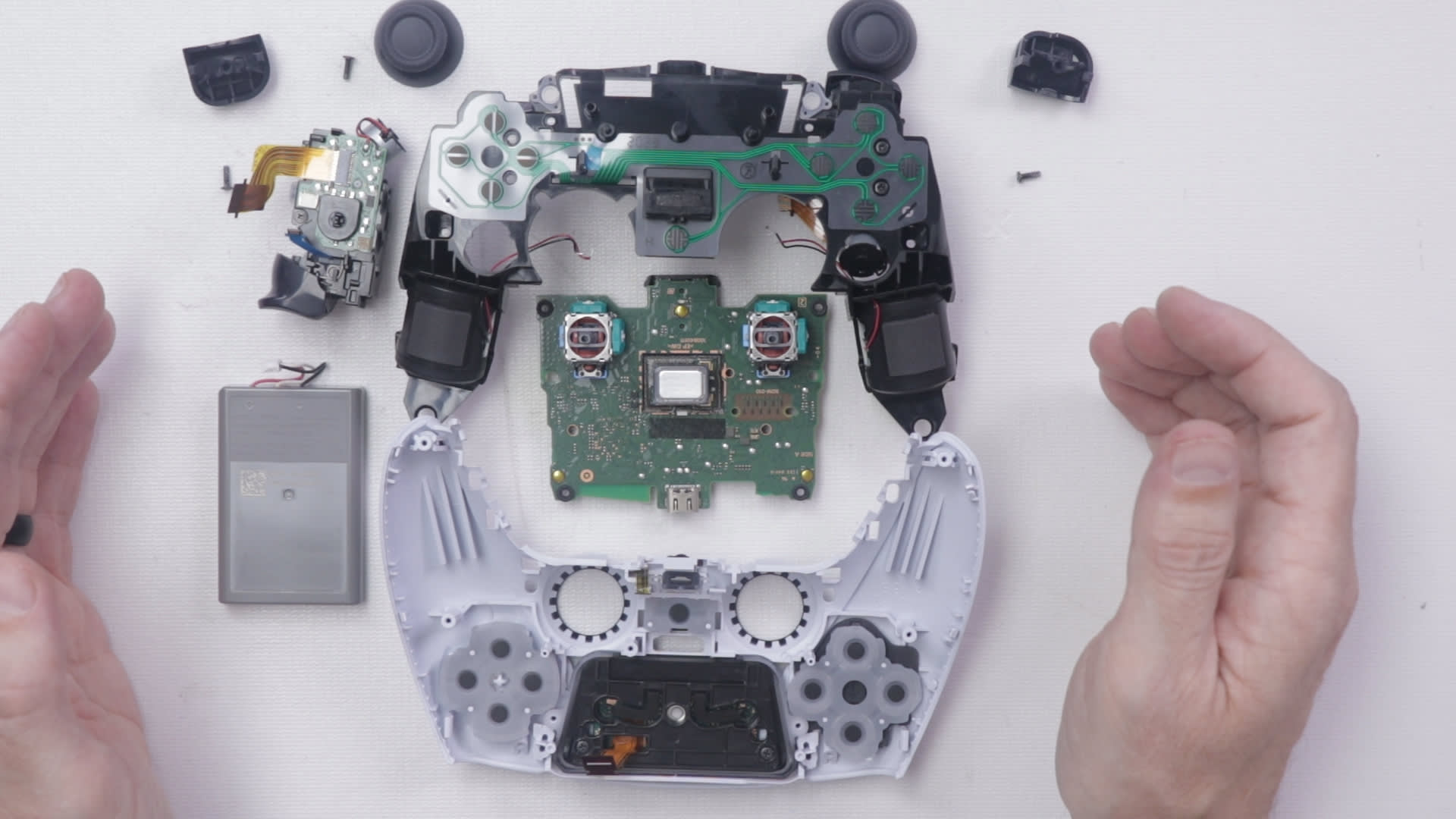
This is the real repair, and it requires soldering. Each stick module is attached to the controller board by around 14 solder joints that must be desoldered and the new module fitted in place.

You have two choices of replacement part, and this decision matters more than the repair itself.
| # | Replacement Type | Cost | Lifespan | Verdict |
|---|---|---|---|---|
| 1 | Standard potentiometer | ~$5-10 | Same as original | Will drift again eventually |
| 2 | Hall effect module | ~$15 | ~10x longer | The correct choice |
Fitting a like-for-like potentiometer restarts the same wear clock you just reached the end of. Given that the labour is identical, spending the extra few dollars on Hall effect is straightforwardly the better decision.
Warning
The DualSense contains a lithium battery and the trigger assemblies are under spring tension. Disconnect the battery before doing anything else, and photograph each step as you disassemble — the ribbon cables are fragile and their routing is not obvious on reassembly. If you have never soldered before, a controller board is not the ideal place to learn; paid repair services fit Hall effect modules for a modest fee.
Fix 6: Buy a Controller With Hall Effect Sticks
If repair is not appealing, several manufacturers now ship controllers with Hall effect sticks as standard.
Hall effect sensors detect the position of a magnet rather than physically touching anything. No contact means no friction, no carbon track, and no wear-based drift. They are not literally immortal — the magnets can weaken over many years — but they eliminate the failure mode that kills most controllers.
No Physical Contact
Magnetic sensing means nothing rubs against anything. The primary wear mechanism simply does not exist.
Roughly Ten Times the Lifespan
Not marketing — a direct consequence of removing friction from the measurement.
Immune to Dust Ingress
Contamination cannot scratch a track that is not being touched in the first place.
The trade-off is cost. Hall effect controllers carry a premium, and first-party pads from Sony and Microsoft still largely use potentiometers.
How to Make Controllers Last Longer
None of this prevents wear entirely, but it slows it meaningfully.
- Keep controllers covered or in a drawer. Dust is the accelerant, and an open shelf collects it.
- Do not eat while playing. Crumbs and grease reach the stick mechanism far more easily than people expect.
- Ease off the stick pressure. Forcing the stick hard against its outer limit increases wear on the track edges.
- Rotate between two controllers if you play heavily. Halving hours per unit roughly doubles time to drift.
- Clean the exterior monthly with a dry microfibre cloth around the stick bases.
If you are shopping for a replacement pad anyway, the September console slate is worth timing around — Marvel's Wolverine and GTA 6 both tend to bring controller bundles with them.
Frequently Asked Questions
Can stick drift be fixed permanently?
Only by replacing the stick module. Cleaning and recalibration are temporary because the underlying cause is physical wear on the potentiometer's carbon track. A Hall effect replacement module — around $15 — uses magnetic sensing with no physical contact, which removes the wear mechanism entirely.
Does cleaning a controller fix stick drift?
Sometimes, and temporarily. Cleaning with 99% isopropyl alcohol removes dust from between the wiper and the resistive track, which helps when contamination is the immediate cause. If the carbon track itself is worn through, cleaning changes nothing and the drift returns within weeks.
How long before a controller develops stick drift?
Roughly 300 hours of gameplay is the commonly cited threshold for potentiometer-based sticks, though it varies with how hard you push the sticks and how much dust the controller is exposed to. Heavy competitive players often see it sooner; occasional players may never reach it.
Will Sony replace a DualSense with stick drift?
Yes, free of charge within the first 12 months of purchase, covering drift that develops under normal use. Microsoft has a similar warranty process for Xbox controllers. Opening the controller yourself voids this, so always check warranty status before attempting any repair.
Are Hall effect controllers worth it?
If you play regularly, yes. Hall effect sticks use magnetic sensors that never physically touch anything, so they last roughly ten times longer than potentiometer sticks and are immune to dust-driven wear. The upfront premium is usually less than the cost of replacing a drifting controller once.
The Bottom Line
Work through it in cost order: check the warranty, then recalibrate, then clean. Those three are free and one of them may buy you enough time to stop caring.
When drift comes back — and with potentiometer sticks it will — the decision is between repeatedly masking it with deadzones or spending $15 and an hour on a Hall effect module that removes the problem for good. For anyone who plays regularly, that is not a close call.
For more peripheral troubleshooting, our guides on disabling gaming mode on your keyboard and optical versus mechanical keyboard switches cover the same wear-versus-contactless trade-off on the keyboard side.
Repair photography courtesy of iFixit, TronicsFix and the respective manufacturers, used for editorial coverage.
Sources
- iFixit, How to Fix Stick Drift for a PlayStation DualSense Controller, retrieved 2026-07-27, https://www.ifixit.com/Guide/How+to+Fix+Stick+Drift+for+a+PlayStation+Dualsense+Controller+V1/168202
- Turtle Beach, Hall Effect Controllers Explained: The Stick Drift Solution, retrieved 2026-07-27, https://www.turtlebeach.com/blog/hall-effect-controllers-stick-drift-solution
- TechTimes, DualSense Drift Fix: Easy Ways to Solve PS5 Controller Problems and Joystick Drift, retrieved 2026-07-27, https://www.techtimes.com/articles/313290/20251211/dualsense-drift-fix-easy-ways-solve-ps5-controller-problems-joystick-drift.htm
- Analytics Insight, How to Stop Stick Drift Issues in Your Controller for Good, retrieved 2026-07-27, https://www.analyticsinsight.net/gaming/how-to-stop-stick-drift-issues-in-your-controller-for-good
- iFixit Answers, How do I fix the stick drift — DualSense Controller V3, retrieved 2026-07-27, https://www.ifixit.com/Answers/View/895799/How+to+I+fix+the+stick+drift